


 Homepage
 Forum
Forum Drivers
 HMM-Manuals
 MTM
MTM Feed
Feed
Hi-
I am using a T60 and I am getting a Bluetooth error message everyday...
I have attached a screenshot of the error that follows the typical 'Windows has encountered a problem' message.
Whether or not Bluetooth radio is ON or OFF, it still happens and it's driving me crazy.
Has anyone experienced this problem before? I don't know what is causing it.
img]http://img.photobucket.com/albums/v511/ ... _error.jpg[/img]
Note from Moderator: No warning in the subject line = no images
Take a look at our
ThinkPads.com HOME PAGE
For those who might want to contribute to the blog, start here: Editors Alley Topic
Then contact Bill with a Private Message
ThinkPads.com HOME PAGE
For those who might want to contribute to the blog, start here: Editors Alley Topic
Then contact Bill with a Private Message
Bluetooth error
-
johnny0001
- Posts: 10
- Joined: Thu Dec 21, 2006 9:50 pm
- Location: Wayne, NJ
Bluetooth error
Last edited by johnny0001 on Mon Mar 26, 2007 4:39 pm, edited 1 time in total.

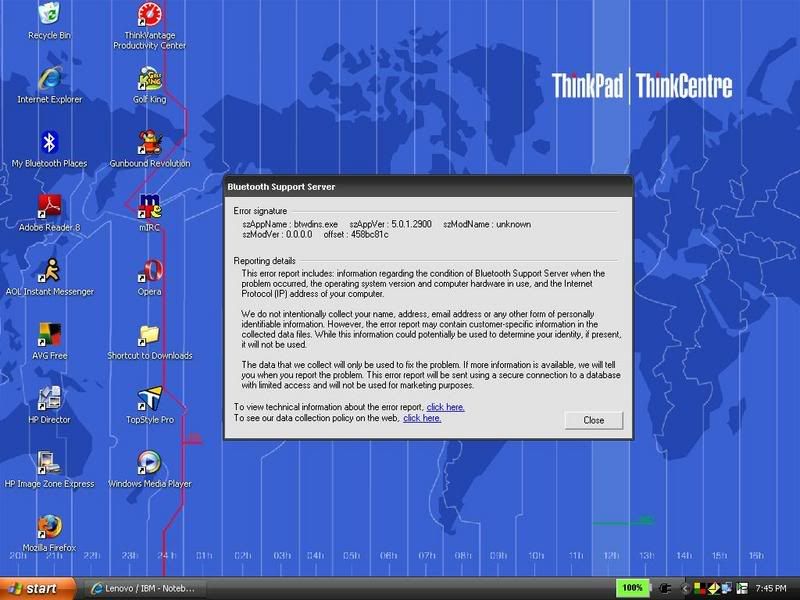
It seems that you are using an old version 5.0.1.2900. It will be worth while to try upgrading to the latest version 5.1.0.2100.
http://www-307.ibm.com/pc/support/site. ... 61425.html
http://www-307.ibm.com/pc/support/site. ... 61425.html
X61
-
johnny0001
- Posts: 10
- Joined: Thu Dec 21, 2006 9:50 pm
- Location: Wayne, NJ
I uninstalled ThinkPad Bluetooth with Enhanced Data Rate in control panel
rebooted
clicked Fn+F5, turned on Bluetooth, got the Found new hardware wizard, clicked Cancel
I ran the 7jba03ww.exe that is on the link you gave me
It did not ask me but after installation, I rebooted again
Now, I am still getting the Found new hardware wizard upon windows startup and in control panel, I do not see Bluetooth with Enhanced Data Rate.
Did I miss a crtitical step or is the new version of Bluetooth with Enhanced Data Rate named differently in control panel this time?
I am not getting the error message but it might be because Bluetooth software isnt installed.
rebooted
clicked Fn+F5, turned on Bluetooth, got the Found new hardware wizard, clicked Cancel
I ran the 7jba03ww.exe that is on the link you gave me
It did not ask me but after installation, I rebooted again
Now, I am still getting the Found new hardware wizard upon windows startup and in control panel, I do not see Bluetooth with Enhanced Data Rate.
Did I miss a crtitical step or is the new version of Bluetooth with Enhanced Data Rate named differently in control panel this time?
I am not getting the error message but it might be because Bluetooth software isnt installed.
-
johnny0001
- Posts: 10
- Joined: Thu Dec 21, 2006 9:50 pm
- Location: Wayne, NJ
-
johnny0001
- Posts: 10
- Joined: Thu Dec 21, 2006 9:50 pm
- Location: Wayne, NJ
Alright, it's installed.
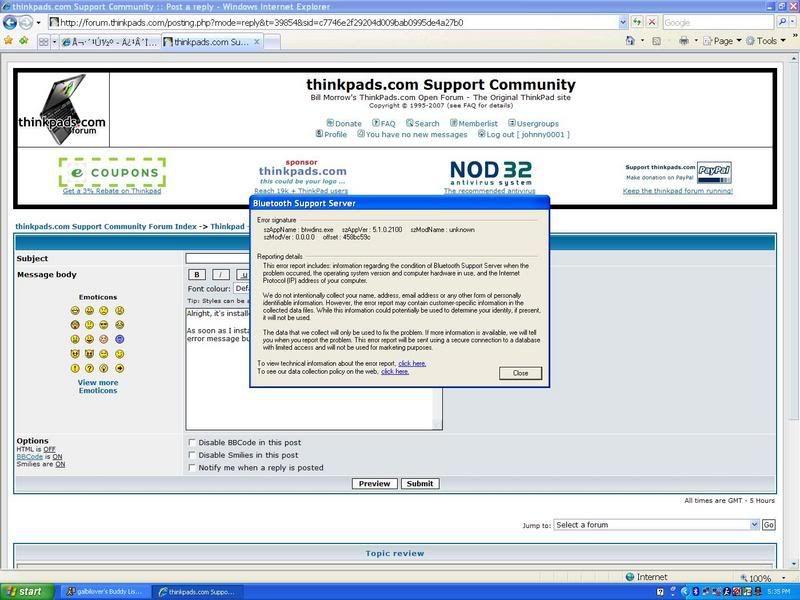
As soon as I installed it, a few minutes after, I got the same exact error message but the version number is obviously different this time.
If you have any other suggestions, please let me know. I would call Lenovo technical support but it doesn't seem like a widely known problem.
img]http://img.photobucket.com/albums/v511/ ... error2.jpg[/img]
Note from Moderator: No warning = no images
As soon as I installed it, a few minutes after, I got the same exact error message but the version number is obviously different this time.
If you have any other suggestions, please let me know. I would call Lenovo technical support but it doesn't seem like a widely known problem.
img]http://img.photobucket.com/albums/v511/ ... error2.jpg[/img]
Note from Moderator: No warning = no images
-
johnny0001
- Posts: 10
- Joined: Thu Dec 21, 2006 9:50 pm
- Location: Wayne, NJ
-
johnny0001
- Posts: 10
- Joined: Thu Dec 21, 2006 9:50 pm
- Location: Wayne, NJ
-
johnny0001
- Posts: 10
- Joined: Thu Dec 21, 2006 9:50 pm
- Location: Wayne, NJ
I am not 100% sure what is causing the error but I was able to replicate it by playing a game on ijji.com (Switcheroo, to be specific)
That doesn't make any sense to me but every time I play for a few minutes and exit, a bluetooth error follows.
I'll stop playing that game for 24 hrs and see what happens.
That doesn't make any sense to me but every time I play for a few minutes and exit, a bluetooth error follows.
I'll stop playing that game for 24 hrs and see what happens.
-
- Similar Topics
- Replies
- Views
- Last post
-
-
W520 doesn't boot after critical battery error...
by salzrat » Mon Mar 16, 2026 12:18 pm » in ThinkPad W500/W510/W520 and W700/W701 Series - 12 Replies
- 5280 Views
-
Last post by RealBlackStuff
Fri Mar 20, 2026 1:32 pm
-
-
-
T420 BIOS update fails with "BIOS directory not found" error
by FastCabbage » Mon Apr 20, 2026 3:40 pm » in ThinkPad T400/T410/T420 and T500/T510/T520 Series - 0 Replies
- 279 Views
-
Last post by FastCabbage
Mon Apr 20, 2026 3:40 pm
-
-
-
TrackPoint and Bluetooth problems on T61
by giovanazzi » Mon Nov 03, 2025 7:43 am » in ThinkPad T60/T61 Series - 2 Replies
- 11939 Views
-
Last post by giovanazzi
Mon Nov 03, 2025 10:37 am
-
-
-
T430 and bloody bluetooth
by jronald » Sun Dec 14, 2025 12:01 pm » in ThinkPad T430-T495 / T530-T590 Series - 1 Replies
- 3926 Views
-
Last post by ZaZ
Mon Dec 15, 2025 2:18 am
-
Who is online
Users browsing this forum: No registered users and 40 guests