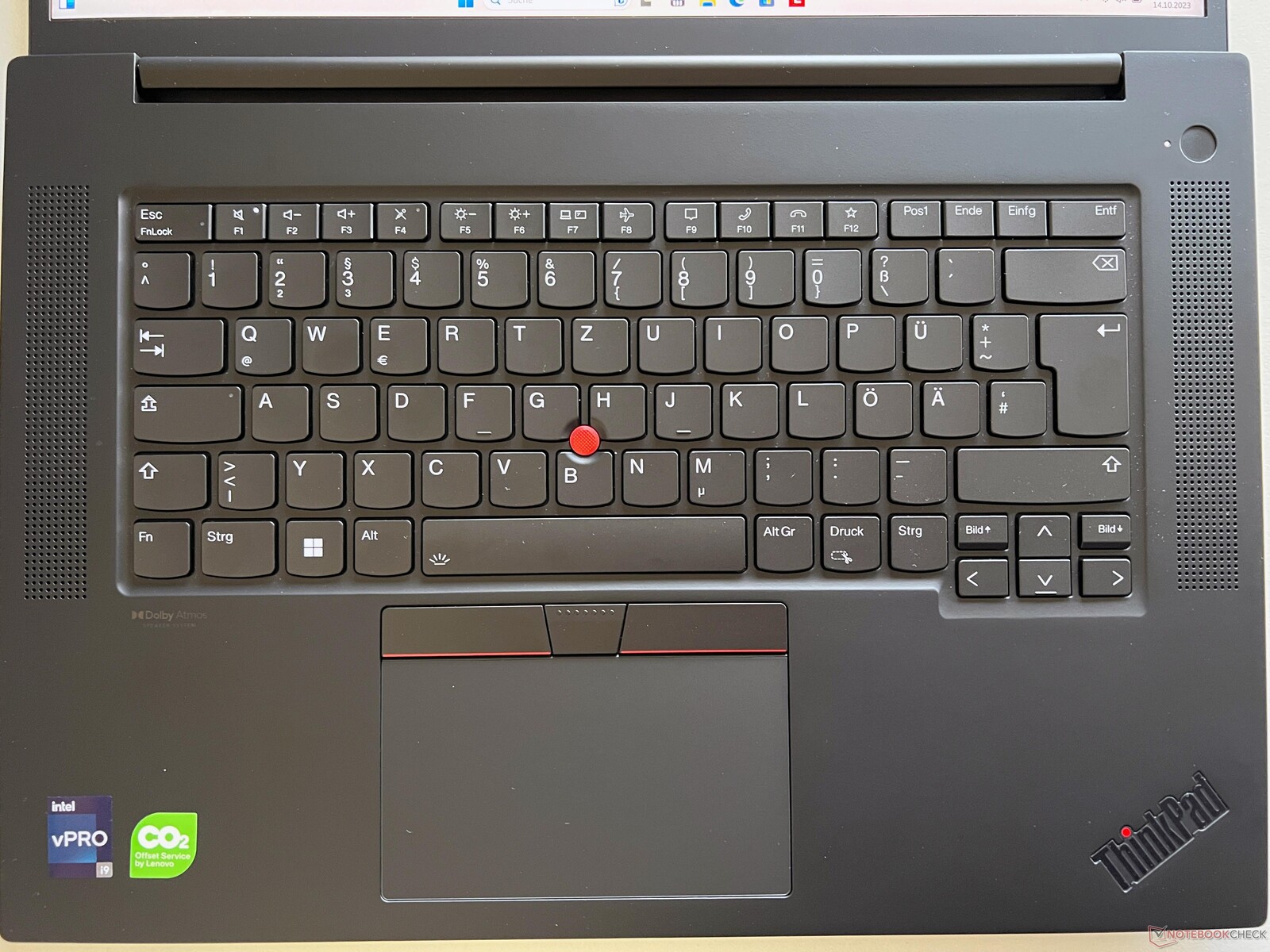
Nordic layout of Thinkpad keyboards
Posted: Sat Feb 10, 2024 5:19 am
Hello,
I’m new to this forum, but I feel like I have something very important to say. Namely, the Lenovo keyboards, which are widely regarded as having the best typing experience, are sadly taking backward steps and that’s even when you exclude the key-travel shrinking year-by-year to 1.5 mm now. I do wish that would go back to 1.8 mm and Lenovo, if you can make that happen, you’ll be a legend.
But what I wanted to speak about is their keyboard layouts and more specifically the full Nordic keyboard layouts for 15 and 16 inch models. I’ve been considering getting a new workstation machine, because my very old E530 is getting even older day-by-day.. and I’ve had my eyes set upon the P16v model. It basically fits my needs in every way. Then one day, I discovered that the Nordic layout has a small, but tragic flaw. And not just this model, but several others as well. Here’s a picture of it:
https://imgur.com/tEZ9g7E
Look at the red area.. there’s 4 keys that are narrower than the others left of it. 3 of those 4 are keys for letters - ones that the Nordic languages very commonly use. How can this be that some of them are narrower? You wouldn’t have U, I, J and K narrower than the other letter keys in the US layout, would you? So why is this happening in the Nordic one!?
This must be solved and I believe it can by:
1) increasing the laptop width ever so slightly and/or making the left and right bezels a tiny bit smaller and the whole laptop frame stronger
2) narrowing the highlighted green area (numpad), again - just a tiny bit; even though it wouldn’t still be ideal, it would make a bit more sense since the numpad is useful, but still less used than the keys of the alphabet
Lenovo V15 has it this way (but of course, some other weirdness too like the asterisk and ENTER having almost no separation and up/down arrow keys different size than left/right):
https://imgur.com/a/CTPxtCt
3) maybe getting some more room by narrowing the TAB, Caps Lock and Left Shift keys on the left side of the keyboard; again, this is perhaps not an ideal solution, but just throwing it out there..
Which kind of brings me back to my solution #1, just increase the laptop width by 5mm, or 7 if that’s what it takes. I think it’s the easiest to do and WAY BETTER than to have some letter keys smaller than the rest, especially if they are common letters in the Nordic languages (Norwegian, Swedish, Danish, Estonian, Finnish, German..). I understand it might not be a problem for US layout kayboards, however - not the whole world is US and there are MANY Thinkpad users in the Nordic countries.
Lenovo, can you please for the love of all that is Holy.. fix this problem for the 2024 models, I’m begging you. Fn/Ctrl could be swapped too, but I’ve heard rumours you’re already doing that soon. And please, show the rest of the computer world how it’s done and DON’T bring a Co-Pilot key, but integrate into a shortcut that can be used by those who want to use it (Winkey + something would work fine).
Everything else should stay the same: the upright-down L-shaped big ENTER key and the arrow keys having their own little separated ‘nest’ down there, the way it is in the P16v photo above.
Thank you for your time reading this and here’s to hoping that common sense will prevail.
Kind regards,
zil
I’m new to this forum, but I feel like I have something very important to say. Namely, the Lenovo keyboards, which are widely regarded as having the best typing experience, are sadly taking backward steps and that’s even when you exclude the key-travel shrinking year-by-year to 1.5 mm now. I do wish that would go back to 1.8 mm and Lenovo, if you can make that happen, you’ll be a legend.
But what I wanted to speak about is their keyboard layouts and more specifically the full Nordic keyboard layouts for 15 and 16 inch models. I’ve been considering getting a new workstation machine, because my very old E530 is getting even older day-by-day.. and I’ve had my eyes set upon the P16v model. It basically fits my needs in every way. Then one day, I discovered that the Nordic layout has a small, but tragic flaw. And not just this model, but several others as well. Here’s a picture of it:
https://imgur.com/tEZ9g7E
Look at the red area.. there’s 4 keys that are narrower than the others left of it. 3 of those 4 are keys for letters - ones that the Nordic languages very commonly use. How can this be that some of them are narrower? You wouldn’t have U, I, J and K narrower than the other letter keys in the US layout, would you? So why is this happening in the Nordic one!?
This must be solved and I believe it can by:
1) increasing the laptop width ever so slightly and/or making the left and right bezels a tiny bit smaller and the whole laptop frame stronger
2) narrowing the highlighted green area (numpad), again - just a tiny bit; even though it wouldn’t still be ideal, it would make a bit more sense since the numpad is useful, but still less used than the keys of the alphabet
Lenovo V15 has it this way (but of course, some other weirdness too like the asterisk and ENTER having almost no separation and up/down arrow keys different size than left/right):
https://imgur.com/a/CTPxtCt
3) maybe getting some more room by narrowing the TAB, Caps Lock and Left Shift keys on the left side of the keyboard; again, this is perhaps not an ideal solution, but just throwing it out there..
Which kind of brings me back to my solution #1, just increase the laptop width by 5mm, or 7 if that’s what it takes. I think it’s the easiest to do and WAY BETTER than to have some letter keys smaller than the rest, especially if they are common letters in the Nordic languages (Norwegian, Swedish, Danish, Estonian, Finnish, German..). I understand it might not be a problem for US layout kayboards, however - not the whole world is US and there are MANY Thinkpad users in the Nordic countries.
Lenovo, can you please for the love of all that is Holy.. fix this problem for the 2024 models, I’m begging you. Fn/Ctrl could be swapped too, but I’ve heard rumours you’re already doing that soon. And please, show the rest of the computer world how it’s done and DON’T bring a Co-Pilot key, but integrate into a shortcut that can be used by those who want to use it (Winkey + something would work fine).
Everything else should stay the same: the upright-down L-shaped big ENTER key and the arrow keys having their own little separated ‘nest’ down there, the way it is in the P16v photo above.
Thank you for your time reading this and here’s to hoping that common sense will prevail.
Kind regards,
zil