


 Homepage
 Forum
Forum Drivers
 HMM-Manuals
 MTM
MTM Feed
Feed
Take a look at our
ThinkPads.com HOME PAGE
For those who might want to contribute to the blog, start here: Editors Alley Topic
Then contact Bill with a Private Message
ThinkPads.com HOME PAGE
For those who might want to contribute to the blog, start here: Editors Alley Topic
Then contact Bill with a Private Message
Quick review of X60s with some pictues

Quick review of X60s with some pictues
X200: 2.4 GHz, 4 GB RAM, 160 GP @ RPM drive, WinVista Business 64-bit
X60s (1704-4DU): 1.66 Core Duo, 1.5 GB RAM, 100 GB @ 7200 RPM drive, WinXP Pro
T40p: 1.6 GHz, 1.5 GB RAM, 60 GB @ 7200 rpm drive, 64 MB Video, 802.11 a/b, WinXP Pro
X60s (1704-4DU): 1.66 Core Duo, 1.5 GB RAM, 100 GB @ 7200 RPM drive, WinXP Pro
T40p: 1.6 GHz, 1.5 GB RAM, 60 GB @ 7200 rpm drive, 64 MB Video, 802.11 a/b, WinXP Pro
-
Brave_turtle
- Posts: 49
- Joined: Sun Dec 11, 2005 7:34 pm
I don't know if you can compare them, because of the real state.
But, in terms of brightness, the X60s display seems a bit brighter. The whites are a bit whiter, if that makes any sense.
Again, aside from the resolution difference, it is a great display. And with the ClearType turned on, all fonts look quite crisp.
BTW, the video card lets you change the LCD's refresh rate. You can select either 40, 50 or 60Hertz. The default is 50 Herts, but I changed it to 60 and I can't really tell the difference, nor know how it is better/worst, except that it renders faster
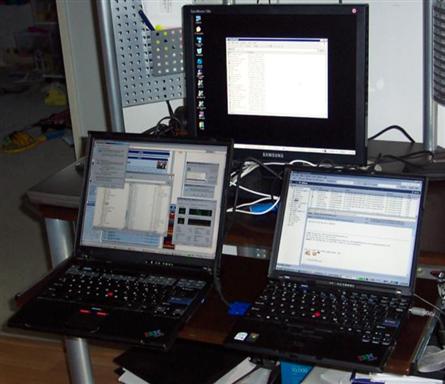
BTW, the 17" LCD on the back of this image http://www.josesandoval.com/images/9.JPG is actually being driven from the X60s VGA plug--the dual display works great and it just work, i.e., no need to install drivers of any sort (the 17" display resolution is 1280x1024).
But, in terms of brightness, the X60s display seems a bit brighter. The whites are a bit whiter, if that makes any sense.
Again, aside from the resolution difference, it is a great display. And with the ClearType turned on, all fonts look quite crisp.
BTW, the video card lets you change the LCD's refresh rate. You can select either 40, 50 or 60Hertz. The default is 50 Herts, but I changed it to 60 and I can't really tell the difference, nor know how it is better/worst, except that it renders faster
BTW, the 17" LCD on the back of this image http://www.josesandoval.com/images/9.JPG is actually being driven from the X60s VGA plug--the dual display works great and it just work, i.e., no need to install drivers of any sort (the 17" display resolution is 1280x1024).
X200: 2.4 GHz, 4 GB RAM, 160 GP @ RPM drive, WinVista Business 64-bit
X60s (1704-4DU): 1.66 Core Duo, 1.5 GB RAM, 100 GB @ 7200 RPM drive, WinXP Pro
T40p: 1.6 GHz, 1.5 GB RAM, 60 GB @ 7200 rpm drive, 64 MB Video, 802.11 a/b, WinXP Pro
X60s (1704-4DU): 1.66 Core Duo, 1.5 GB RAM, 100 GB @ 7200 RPM drive, WinXP Pro
T40p: 1.6 GHz, 1.5 GB RAM, 60 GB @ 7200 rpm drive, 64 MB Video, 802.11 a/b, WinXP Pro
-
- Similar Topics
- Replies
- Views
- Last post
-
-
Got a 600E, but I have some questions about it
by khozmos » Thu Jan 22, 2026 10:36 am » in ThinkPad Legacy Hardware - 3 Replies
- 4005 Views
-
Last post by khozmos
Thu Jan 22, 2026 4:46 pm
-
-
-
Dug my x60s out of storage, it needs a lot of love
by kythri » Sat Feb 07, 2026 7:57 pm » in Thinkpad X60/X61 Series incl. Tablets - 3 Replies
- 2976 Views
-
Last post by Medessec
Mon Mar 02, 2026 1:34 pm
-
Who is online
Users browsing this forum: No registered users and 93 guests