Page 1 of 1
USB-C Charging port issues with X1 Carbon Gen 9 (and maybe others)
Posted: Thu Jun 13, 2024 2:47 am
by mikemex
Hey folks. I was digging on Reddit and I found a guy who clearly explains what's going on with recent Thinkpads failing to charge properly. The discussion was centered around the X1C9 but he says many models are affected, which is probably true since we all know that they've been having issues since Gen 5 (which happens to be the first USB-C model...).
This is a big one, but I hope it can serve folks to fix these awesome units instead of binning them or paying out the nose for a mainboard replacement.
For future reference, primary cause of this issue is the Thunderbolt (USB-C) port(s)' power mosfets degrading and burning out. The chip is a Texas Instruments CSD87501L. On the X1 Carbon Gen9 there's 2 of them, one for each of the USB-C charging supported ports).
These absolutely tiny fragile little buggers run a helluva lot of power through them for their size, and there's pretty much zero heatsink or airflow cooling on or near them. And it seems Lenovo went a little bit overboard with weight reduction so there's not adequate copper there for the chip to effectively sink its heat into the board through its solder joints and traces. I do believe there was a firmware update including some tweaks to improve heat buildup, but results have been marginal at best because code can't fix the underlying issue. Nor does the firmware help an already degrading or failed chip.
A whole bunch of other Lenovo models have the same issue, with the same chip, predominantly for the same reason (lack of cooling).
Depending on severity, failure mode, or if instead caused by a dodgy charger or a short in damaged USB-C charger plug or socket, I have seen cases where the USB-C PD charging controller chip has given up too, but this is much less common. That chip is a Texas Instruments TPS65994AD.
If looking to repair this, first: Inspect the state of your USB-C ports. Both inside the sockets and ideally their solder joints. If the port, pins or joints are damaged, the port(s) must obviously be fixed/replaced too or you risk having to replace the chip(s) all over again right away.
These are inexpensive parts so get them from a well known vendor to make sure they're not recyled (reusing components from donor boards can often be fine, but not in this particular type of case). I've mostly bought them from Digi-Key, there the power mosfet is about $1 USD and the USB-C PD controller is roughly $6 USD, when buying single digit cut-reel volume.
Different model platforms hsve different designs, so this part only regards to the X1 Carbon Gen9:
Replacing these chips is not soldering iron type work, these are extremely small BGA chips. Equipment for and perience with hot air rework / microsoldering is required. Be warned, these mosfet chips are of the PicoStar type package. They're extremely thin so quite fragile; buy a couple extra, they're really easy to chip and overcook.
The USB-C mosfets on the Gen9 are placed closely behind the ports and on the top side of the mainboard when viewed from the bottom while still inside the chassis. If you're good at it, shield the surrounding area from the heat, and got a bit of balls, it's doable to replace them with the board still in the chassis. However the Thunderbolt/USB-C ports are soldered to the other side, so if you need to check the joints or replace those, the board has to come out (same if working on the controller chip).
Many have issues with these getting even hotter even faster after replacing them. Primary cause of this is solder and overcooking. They have practically no thermal mass what so ever, and with effectively no cooling, you mostly rely on the chip to sink heat into the board via its joints and traces. These are power components so there are heat sinking power snd ground planes to deal with (just not enough for effective cooling); chunky enough to require preheating the area a bit. With the chip having so little thermal mass, I advice keeping the chip out of the way of the heater until the board is hot enough to solder. Don't go overboard with the flux if the board is still in the chassis.
You need to be really conservative on the amount of solder you use, so the chip doesn't ride high on tall balls but can be squished really really close to the board, with full pad coverage joints but without balls shorting. Also, because the X1 Carbon Gen9 has a metal bottom, once you've tested it, I advice removing the little plsstic flap that covers over the mosfets, and throw a dab of thermal putty on the mosfets so when you close it back up the putty contacts the metal bottom lid.
As to the controller chip. That's underfilled. I'm not gonna advice anything there. If you already know how to deal with underfilled chips, you don't need my advice. If you don't, I advice leaving that to someone who does.
Re: Charging port issues with X1 Carbon Gen 9 (and maybe others)
Posted: Thu Jun 13, 2024 4:21 am
by RealBlackStuff
The standard 20V charger-cables with barrel or yellow-slim-tip plugs have only 3 wires (+/-/resistor).
I'd love to see instructions for where to solder these 3 wires into the USB-C/Thunderbolt circuit.
And then: bye, bye crappy useless USB-C!
Re: USB-C Charging port issues with X1 Carbon Gen 9 (and maybe others)
Posted: Fri Jun 21, 2024 3:50 pm
by mikemex
There is more. It appears that Lenovo is well aware of the issue and had to purchase back a lot of machines:
My company bought over 10k Gen 9 X1 Carbons this year--lenovo repeatedly has refused to admit they were defective. The charge port on all of them have been failing 1 by 1. Just heard Lenovo finally capitulated, agreed to buy back all of them and replace them with Gen 10's. FYI--I suspect your mileage will vary in seeking accommodation from them.
How did you go about getting the replacement?
Our organization has had a failure rate of greater than 10% of Lenovo X1 Carbon Gen 9's, with the charging-failure-problem. I've been told over the telephone by the first-level-technical-support-people that they will not entertain replacing with a Gen 10 unless the same failure happens 3 times.
I'll see if I can get more details from IT--but basically i think it came down to my company of 20k employees, that is an all ThinkPad shop, threatening to permanently pull our business away from Lenovo because they refused to admit there was anything systemically wrong.
They later dumped them into the gray market for cheap. I know because I ended up with a few machines myself:
mikemex wrote: ↑Sat Dec 30, 2023 11:14 am
I just got a super deal on an X1C9. I wasn't really looking to upgrade since I'm quite happy with my X1C5, but I couldn't pass on it. I have the perpetual issue to be a Spanish speaker and I find particularily hard to swap keyboard languages on the X1 Carbon series. This machine was far from top of the line (1145G7, 16GB, FHD) but was very well equipped otherwise (IR Camera, WWAN, slim 65W adapter, it even had the etherner adapter). The WWAN and Spanish keyboard combo was simply too hard to resist, since Lenovo doesn't offer WWAN option here in Mexico at any price. It was brand new in box, with warranty, for about $400.
Which is a highly irregular practice, even for Lenovo. My machines:
* Physically show a model number in the labels and BIOS but if you search for warranty on Lenovo site they show a different model number (from the US).
* Manufacturing date shows as 2023, even though the shipment / start date of the warranty begins in 2022.
* They cancelled the warranty, even though it should be still active by date.
* Came configured with Spanish keyboards.
So beware of Lenovo's shady practices. Selling items with undisclosed defects is fraud.
Re: Charging port issues with X1 Carbon Gen 9 (and maybe others)
Posted: Fri Jun 21, 2024 4:08 pm
by mikemex
RealBlackStuff wrote: ↑Thu Jun 13, 2024 4:21 am
The standard 20V charger-cables with barrel or yellow-slim-tip plugs have only 3 wires (+/-/resistor).
I'd love to see instructions for where to solder these 3 wires into the USB-C/Thunderbolt circuit.
And then: bye, bye crappy useless USB-C!
Well, to be honest, Power Delivery is not a bad idea in itself. For example, I read in a forum that you can plug an external monitor into the laptop and it will begin charging.
Implementation is the problem. First, the USB-C was designed with small devices such as phones in mind. It's not really a properly sized port for a laptop. But let's concede that, since its goal is to become an universal port, then it has to be small enough to support all devices. So, why not install the ports and power circuitry in a separate module? In case something goes wrong with it, you simply replace the sub-board.
Corporations make a lot of decisions based on undisclosed motives. For example, I just recently found out that the real reason they are soldering WIFI cards into motherboards is that tracking software can be disabled by just swapping the wireless card. Since machine ID is calculated using parameters such as NIC's MAC, a WIFI adapter coming in a socket allows the user to circumvent such protections easily. This is, in itself, a corporate circumvention on the prohibition to place CPU readable serial numbers due to privacy concerns.
Re: USB-C Charging port issues with X1 Carbon Gen 9 (and maybe others)
Posted: Sat Jun 22, 2024 1:47 am
by RealBlackStuff
Thanks for that info, Mike.
My daily driver is still my trusty T440p with W7 (and no updates since 2018).
My 'newest' (reserve) laptop is a T480, which does not (yet) have any problems, touch wood.
Bought it in January 2023 but have only used it maybe 3 or 4 times.
But should I ever need another laptop, it won't be one from Lenovo.
They seem to get worse every year.
Re: USB-C Charging port issues with X1 Carbon Gen 9 (and maybe others)
Posted: Sat Nov 09, 2024 4:57 pm
by independent
Oh far out. Another charging issue which presumeably affects more than just that model. Like the Thunderbolt issue and the earlier generations. It makes sense that the shrinkification has made the laptops significantly more fragile.
That post on reddit was interesting alright. I can't imagine anyone without proper skills and equipment attempting that repair. Thanks for highlighting it.
Re: USB-C Charging port issues with X1 Carbon Gen 9 (and maybe others)
Posted: Sun Nov 10, 2024 8:39 am
by rumbero
Since the first poster unfortunately didn't provide any original links for the quoted texts, to spare other people from having to search for them, here they are:
old.reddit.com/r/thinkpad/comments/y9x5pl/x1_carbon_gen_9_charging_issues
old.reddit.com/r/thinkpad/comments/zm0rdg/x1c_gen_9_charging_defectslenovo_capitulates
Re: USB-C Charging port issues with X1 Carbon Gen 9 (and maybe others)
Posted: Sun Nov 10, 2024 8:50 am
by RealBlackStuff
And for all of the users who have a laptop with a
USB-C/Thunderbolt port I just posted about what might be a life-saver.
See my post
USB-C/Thunderbolt Magnetic breakaway connector.
Re: USB-C Charging port issues with X1 Carbon Gen 9 (and maybe others)
Posted: Mon Feb 03, 2025 7:25 pm
by mikemex
Hey RBS.
I've said it many times: I'm not really a collector. I greatly appreciate the virtues of the older Thinkpads like many folks around here, but not enough to get stuck in time. So I've just given up and upgraded. I honestly can't say I regret it.
I've been doing AI programming lately and you really notice the difference in performance between older machines and new ones. I thought I'd never run out of memory with 32GB but I did! So I'm getting myself one of those replaceable RAM models so I can get over 32GB. I do miss my classic Thinkpads but life keeps going...
P. S. I do keep my beloved X301!
RealBlackStuff wrote: ↑Sat Jun 22, 2024 1:47 am
Thanks for that info, Mike.
My daily driver is still my trusty T440p with W7 (and no updates since 2018).
My 'newest' (reserve) laptop is a T480, which does not (yet) have any problems, touch wood.
Bought it in January 2023 but have only used it maybe 3 or 4 times.
But should I ever need another laptop, it won't be one from Lenovo.
They seem to get worse every year.
Re: USB-C Charging port issues with X1 Carbon Gen 9 (and maybe others)
Posted: Wed Mar 05, 2025 4:21 am
by Crodo
Hi,
I'm new. So hello forum.
I just got X1 gen 9 with damaged upper thunderbolt. I bought it, because I got an amazing deal - I paid just $300 for the laptop in pristine condition, basically brand new, with brand new battery.
My question is: is the second thunderbolt port also destined to fail, or these ports somehow differ? I read around the internet about this issue, and usually people mention about upper port going bad.
Second question: are there any preventing measures to take care of the second, still working properly usb-c?
From what I understand, it has to do with compotents getting too hot. I assume it is a good idea then, to charge the laptop when its iddling, or during light use, like web browsing, or documents work and avoid charging it while its heavly loaded, to prevent heat build up.
Also I was wondering if it would be good idea to use 45 watt charger insetad of 65 watt, in order to reduce the heat during charging.
Thank you.
Re: USB-C Charging port issues with X1 Carbon Gen 9 (and maybe others)
Posted: Wed Mar 05, 2025 12:46 pm
by mikemex
Crodo wrote: ↑Wed Mar 05, 2025 4:21 am
Hi,
I'm new. So hello forum.
I just got X1 gen 9 with damaged upper thunderbolt. I bought it, because I got an amazing deal - I paid just $300 for the laptop in pristine condition, basically brand new, with brand new battery.
Seems like people always wants to dump their problems on other people. I wouldn't get a machine with a busted port myself, as the motherboard is quite expensive (and they are expensive because there is high demand). But at least you got it for a fair price.
Crodo wrote: ↑Wed Mar 05, 2025 4:21 am
My question is: is the second thunderbolt port also destined to fail, or these ports somehow differ? I read around the internet about this issue, and usually people mention about upper port going bad.
Both ports can fail. Thing is, the first port often fails earlier because that's the port most people use. I don't think everyone knows that the second port also charges the laptop. I certainly did not at first.
I believe the Gen 9 was also affected with the Thunderbolt bug. They messed it up with the firmware and it kept writing over and over to the EEPROM that contains the code for the charging ports. Unpatched, it eventually exhausted the port's program chip and it failed, no matter what you do. So the first thing to do is to upgrade the BIOS.
Crodo wrote: ↑Wed Mar 05, 2025 4:21 am
Second question: are there any preventing measures to take care of the second, still working properly usb-c?
From what I understand, it has to do with components getting too hot. I assume it is a good idea then, to charge the laptop when its idling, or during light use, like web browsing, or documents work and avoid charging it while its heavily loaded, to prevent heat build up.
Myself, I never charge the machine while I'm working on it, I do it like with my phone: I just plug it at night and leave it charge overnight.
So yeah, anything you can do to reduce power draw during charging, and thus heat, is going to improve its life. That's actually a general consideration for modern electronics. That's why I never charge my phone with those über powerful chargers. I use a 2A regular USB-C and never had an issue with the charging port.
Also, install and keep ThrottleStop running with a decent TDP value. That's prevent the machine from producing too much heat during peak load situations.
Crodo wrote: ↑Wed Mar 05, 2025 4:21 am
Also I was wondering if it would be good idea to use 45 watt charger insetad of 65 watt, in order to reduce the heat during charging.
Absolutely. I'd even get a PD charger with even less wattage. That saves you from manually checking the airplane mode which limits the charging power to 15W.
Re: USB-C Charging port issues with X1 Carbon Gen 9 (and maybe others)
Posted: Wed Mar 05, 2025 4:52 pm
by Crodo
Thank you Sir.
I pulled the trigger, because I have 14 days to return it, so I had extra time to dive deeper and investigate what is the issue, to see whats the machine inside, to evaluate and make final decision…
…and boy, I was not expecting this… This whole usb-c gate thing.
Just imagine: you know nothing about laptops. You watch some youtube videos, see some comparisons, some reviews (what the hell - NO ONE mentions ANYTHING about these computers having the port issues btw). So you hop on band wagon for thinkpads, then stars align that it has to be x1. Then you see this deal for 1/7 the price and well, I’m here now.
A bit disapointing, considering I did my „laptop research” since I’m a pc guy for over 3 decades. I had absolutely 0 knowledge nor interest in laptops until recently and to me these are the deep waters a bit. But what the hell, its fun so far.
They also give me 12 months guarantee, so its worth the risk in my book, and laptop is acually for my wife just to run some word and web pages. It will not be used even to watch anything, not to mention play games or do anything heavier than opening 5 tabs in chrome.

Wish me luck.
Re: USB-C Charging port issues with X1 Carbon Gen 9 (and maybe others)
Posted: Wed May 28, 2025 3:34 am
by AngryThinkPadUser
I have the same issue with my ThinkPad T16 Gen 1.
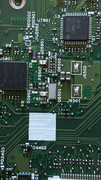
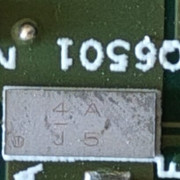
Everything started when I connected the Anker Prime 27,650mAh 250W Power Bank. The Type-C charging port stopped charging the laptop, even though the battery indicator showed it was plugged in. I only realized the issue when the battery percentage began to drop. The same thing happened with the second Type-C port (I later understood it was caused by the Anker Power Bank).
Could you please help me identify the model of this MOSFET? Please see the attached images.
Re: USB-C Charging port issues with X1 Carbon Gen 9 (and maybe others)
Posted: Wed Jan 28, 2026 10:05 pm
by Orions327
First of all, Thank to @mikemex for your post! I mean it is exactly what happening for modern Thinkpad.
I just got the same problems (X1 carbon gen 9) with both of CSD87501L burned to dead.
LoL...even I have some Dell XPS, Asus Vivobook, lenovo Flex... I repaired....This is the first time I have X1 carbon (Buy for P/R).
When I saw 2 super tiny (CSD87501) even I don't know what they are, I never seen anything like that. First, I think they are Mosfet because motherboard write Q261 and Q263 but not sure, I don't have its boardview or schematic. Finally, I know X1 carbon 9th gen is using the same motherboard for thinkpad Yoga gen 6 then find out they are CSD87501.
Still on the way, the problem is, it is very hard to solder them to replace new one. I mean, it is very very small and thin (0.2mm), easy to burn when use soldering.
Re: USB-C Charging port issues with X1 Carbon Gen 9 (and maybe others)
Posted: Thu Feb 05, 2026 6:46 pm
by independent
I think it was this thread that really convinced me how bad USB C is for charging decently powered computers.. As much as the convenience is for a single cable for all-your-computing-needs.. At least on thinkpads they give you two USB charging ports.. In case one dies of course.
I generate all my own electricity and have to say the slim charging port is uber convenient. You can buy 230w ones (just the cable and the tip) for cheap on Ali. But other than that RealBlackStuff's suggestion of magnetised connectors for longetivity are great. I just need to find ones that fit more flush to the computer..
Re: USB-C Charging port issues with X1 Carbon Gen 9 (and maybe others)
Posted: Sat Feb 07, 2026 8:34 am
by babblefish
Glad I ran across this post. I just bought a X1 Tablet Gen 3 off eBay and while it looks brand new (not a scratch on it and perfectly clean, plus the installed Windows 11 has never been initiated), the CMOS battery was dead and the main battery won't take a charge from either port. I have a new main battery coming in the mail, but if that doesn't solve the charging problem, I'll have to look into replacing those darn tiny CSD87501L chips. The spec sheet says they're 3.37mm x 1.47mm x 0.2mm(!). I have a hot air gun, but I'm also 72 years old so my eyesight ain't what it used to be. On the other hand, I just replaced a SMD zener diode in an old Onkyo AV receiver that was 1.95mm x 1.35mm x 0.90mm using a soldering iron with a 1mm diameter tip.
Re: USB-C Charging port issues with X1 Carbon Gen 9 (and maybe others)
Posted: Sun Feb 08, 2026 2:34 pm
by MasterYoga
Is X1Y6 also affected by this issue? Has it been fixed in the X1C10 or the X1Y7?
Re: USB-C Charging port issues with X1 Carbon Gen 9 (and maybe others)
Posted: Sun Feb 08, 2026 2:37 pm
by mpcook
MasterYoga wrote: ↑Sun Feb 08, 2026 2:34 pm
Is X1Y6 also affected by this issue? Has it been fixed in the X1C10 or the X1Y7?
Yes, the X1Yoga Gen 6 is affected. You can find info on the Lenovo Community Board
https://forums.lenovo.com/t5/One-Langua ... munity-OLC
Re: USB-C Charging port issues with X1 Carbon Gen 9 (and maybe others)
Posted: Mon Feb 09, 2026 9:52 pm
by Orions327
babblefish wrote: ↑Sat Feb 07, 2026 8:34 am
Glad I ran across this post. I just bought a X1 Tablet Gen 3 off eBay and while it looks brand new (not a scratch on it and perfectly clean, plus the installed Windows 11 has never been initiated), the CMOS battery was dead and the main battery won't take a charge from either port. I have a new main battery coming in the mail, but if that doesn't solve the charging problem, I'll have to look into replacing those darn tiny CSD87501L chips. The spec sheet says they're 3.37mm x 1.47mm x 0.2mm(!). I have a hot air gun, but I'm also 72 years old so my eyesight ain't what it used to be. On the other hand, I just replaced a SMD zener diode in an old Onkyo AV receiver that was 1.95mm x 1.35mm x 0.90mm using a soldering iron with a 1mm diameter tip.
Finally, I sure all my 87501 are dead.
For testing, you can try short-cut both of them (CSD87501), don't worry, Laptop will be OK if it is OK before. Login to Bios and test battery.
I mean, We have to know exactly what problem.
I want to post some picture here but don't know how to do.
Re: USB-C Charging port issues with X1 Carbon Gen 9 (and maybe others)
Posted: Thu Feb 12, 2026 4:32 am
by babblefish
Orions327 wrote: ↑Mon Feb 09, 2026 9:52 pm
babblefish wrote: ↑Sat Feb 07, 2026 8:34 am
Glad I ran across this post. I just bought a X1 Tablet Gen 3 off eBay and while it looks brand new (not a scratch on it and perfectly clean, plus the installed Windows 11 has never been initiated), the CMOS battery was dead and the main battery won't take a charge from either port. I have a new main battery coming in the mail, but if that doesn't solve the charging problem, I'll have to look into replacing those darn tiny CSD87501L chips. The spec sheet says they're 3.37mm x 1.47mm x 0.2mm(!). I have a hot air gun, but I'm also 72 years old so my eyesight ain't what it used to be. On the other hand, I just replaced a SMD zener diode in an old Onkyo AV receiver that was 1.95mm x 1.35mm x 0.90mm using a soldering iron with a 1mm diameter tip.
Finally, I sure all my 87501 are dead.
For testing, you can try short-cut both of them (CSD87501), don't worry, Laptop will be OK if it is OK before. Login to Bios and test battery.
I mean, We have to know exactly what problem.
I want to post some picture here but don't know how to do.
Since I'm replacing the battery anyway (it is, after all, 9 years old), I'll find out if the 87501's are dead if it won't charge. Replacing those chips will be interesting though because they appear to be surrounded closely by a lot of other tiny bits.
Re: USB-C Charging port issues with X1 Carbon Gen 9 (and maybe others)
Posted: Fri Feb 20, 2026 4:26 pm
by babblefish
Just replaced the battery in my gen 3 X1 tablet and it charges! Thank goodness I don't have to replace that tiny charge control chip.
Re: USB-C Charging port issues with X1 Carbon Gen 9 (and maybe others)
Posted: Wed Mar 11, 2026 5:31 am
by neclaw
Hello to everyone and thank you for sharing you thoughts in this thread, very helpful.
Now it's pretty clear that this is a design issue. However if the laptop still works I can image that this can be prevented using some heatsink on the mosfets. Thermal pads stacked until it reaches the cover of the laptop. What do you guys think?
The problem with magnetic connectors (at least with the ones i've seen) is that of the static current and exposure of the electrical contacts to everything (even your clothes or your static electricity)
Re: USB-C Charging port issues with X1 Carbon Gen 9 (and maybe others)
Posted: Fri Apr 10, 2026 3:25 pm
by t20user
Well I was a fool and bought a Gen 9 with "one bad USB port". After a month of use it now has 2 bad USB ports and will not charge. Unfortunately I was unaware of this design flaw before buying. After reading this post I opened the lid and found the FETs have signs of thermal stress so I placed an order for replacement FET's and plan to replace them on my board. I have the equipment to hot-air solder and inspect so it shouldn't be a difficult repair. I will report back when I place the new FETs.
