Page 1 of 1
Windows 7 on T25 - any "real life" experiences ?
Posted: Tue Sep 18, 2018 8:22 am
by ajkula66
Not trying to start an OS flame war, or a discussion about pros and cons of T25. Just two simple questions:
1) Has anyone attempted to install W7 in any shape or form on a T25 ?
2) If so, what were your experiences ?
Thanks in advance for any wisdom.
Re: Windows 7 on T25 - any "real life" experiences ?
Posted: Tue Sep 18, 2018 2:57 pm
by theterminator93
From what I can tell, at least one person here has tried. But it didn't appear to work... quote from the relevant thread is below.
Bibin wrote: ↑Wed Oct 18, 2017 12:50 pm
Windows Compatibility
[...]
I fought hard to try to get Windows 7 on the machine, but the combination of no native USB 3.1 drivers plus no native NVMe drivers proved troublesome. I am still working on slipstreaming support in the installer, but since the internal drive is a new NVMe model I am having trouble finding drivers that are appropriate for it.
I looked around and saw a unique response to a poential way to get it to work. I have not tried this method and may be what Bibin tried in the other post. Now that it's been nearly a year there may be a better shot at completing this.
This link posted by RBS might be helpful as well...
It is possible to install Windows 7 onto a T470 with a 7th generation (Kaby Lake) processor. Make sure that you have integrated USB 3.0 drivers into the Windows 7 installation media (install.wim) using Windows AIK. Intel has a handy tool for this:
https://downloadcenter.intel.com/downlo ... or-Utility
Then, grab the boot.wim and setup.exe from a Windows 10 .iso and copy and replace them on your Windows 7 USB installation. Also delete the ei.cfg from the Windows 7 USB (located in \sources directory).
Ensure that your BIOS is set up to boot from USB (including settings for secure boot off).
You should then be able to boot from your modified Windows 7 USB installation. The initial environment (Windows Preinstallation Environment or PE) will look like Windows 10, but that's only because you replaced the boot.wim with a Win10 file. It will install Windows 7.
If you're installing onto NVMe rather than HDD or SSD, be sure to integrate Intel's rapid storage and NVMe drivers into the install.wim as well.
After installation, you should be able to install all the other necessary hardware drivers.
Note, however, that Intel's graphics driver (technically a beta release) for the 6th generation chips (HD 620) work for the integrated graphics in 7th gen SoC. See article here:
http://digiworthy.com/2017/01/28/window ... gp-driver/
These drivers can be downloaded from Intel and other motherboard manufacturers:
Version 4508 Beta at Asus
Version 4508 Beta at Gigabyte
Version 4552 Beta at Intel (actually only for HD 615 and HD 620)
Version 4565 Beta at ASRock
You don't need to integrate them into install.wim, just install after Windows 7 boots.
https://www.intel.com/content/www/us/en ... orage.html
Re: Windows 7 on T25 - any "real life" experiences ?
Posted: Tue Sep 18, 2018 3:07 pm
by ajkula66
@terminator93:
Thanks for the info posted. It seems that a significant headache could be waiting for those who choose to entertain the "W7 on a T25" concept.
Re: Windows 7 on T25 - any "real life" experiences ?
Posted: Tue Sep 18, 2018 3:29 pm
by theterminator93
I may be out of my mind... but I think I'm actually going to give it a shot. If I can get the installer to recognize the HDD then I'll consider it a "success" - but I don't have any intentions to wipe my T25 to see about other Win7 drivers [yet]. I'll report back after a while.
Re: Windows 7 on T25 - any "real life" experiences ?
Posted: Tue Sep 18, 2018 4:24 pm
by MikalE
Please do. I know someone with a 7th generation Intel that wants to load Win7. If your project works I will copy and paste any info you might add to the above.
Re: Windows 7 on T25 - any "real life" experiences ?
Posted: Tue Sep 18, 2018 7:50 pm
by theterminator93
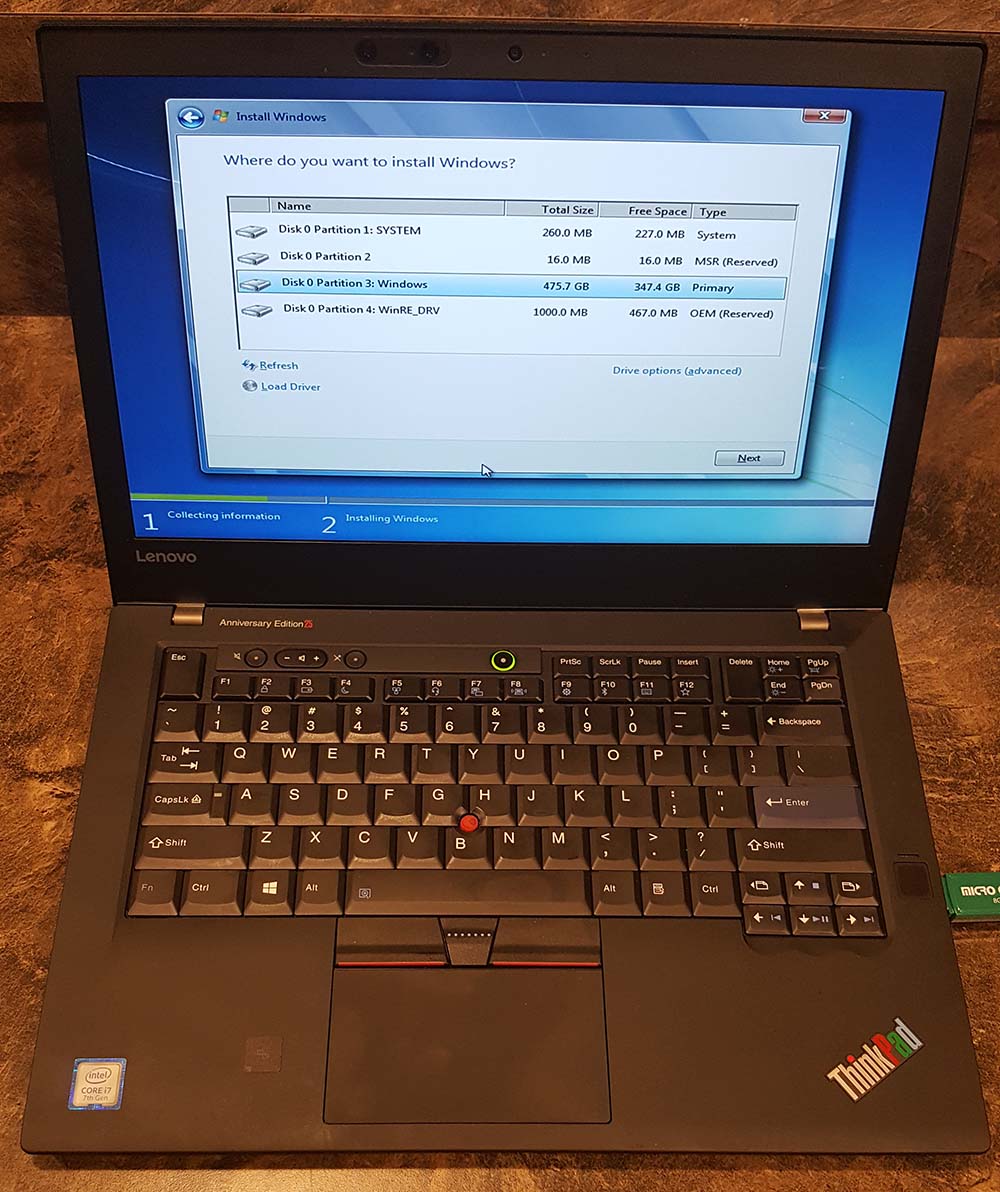
I successfully modified the Windows 7 installer to load, recognize USB 3.0 devices as well as the NVMe SSD. I did not go beyond letting the installer see the various W10 partitions of the factory preload. Here's what worked - fairly simple, actually...
You need a Windows 7 Pro x64 ISO (I used one with SP1 already installed). You will also need these two files:
https://pcsupport.lenovo.com/us/en/downloads/ds121505 (NVMe hotfix - also includes USB3 drivers but I did not use or test them on my TP25).
https://download.lenovo.com/pccbbs/mobiles/hvui08ww.exe (USB 3.0 controller driver)
Start by writing the Windows 7 ISO to a USB drive. I use Rufus as it's simple and always works for me. Be sure to use GPT partitions and NTFS file system.
Run the NVMe hotfix .bat - there are instructions included with the installer.
Add the USB 3.0 drivers. Instructions on doing that are here:
http://codeabitwiser.com/2014/03/how-to ... 3-0-ports/
Reboot to BIOS setup (F1). Disable secure boot, and enable legacy support. The last bit is important - even though we're doing a UEFI Windows 7 install, the USB EFI boot will fail if BIOS legacy support is disabled...
Save and boot to your USB installer (F12). It should pop up and allow you to proceed as normal. Finding drivers for the rest of the components is the other side of the coin...
This is where I stopped:
http://wannerweb.ddns.net/Public/Photos ... 7-inst.jpg
Re: Windows 7 on T25 - any "real life" experiences ?
Posted: Tue Sep 18, 2018 8:03 pm
by MikalE
Thank you for posting. I'm not certain he is technically minded enough to perform this, but I will certainly post this info and he can make up his own mind.
Re: Windows 7 on T25 - any "real life" experiences ?
Posted: Tue Sep 18, 2018 8:27 pm
by ajkula66
Wow. Many a thanks for going even this far, terminator93, highly appreciated.
Yeah, my prospective client will have to drop a serious coin in order for me to take a dive into this particular experience.
Nevertheless, keep the responses coming - if there are any additional experiences and/or observations out there to begin with - I'd love to hear them.
Nothing compares to TPF community. Ever.
Re: Windows 7 on T25 - any "real life" experiences ?
Posted: Sun Sep 23, 2018 3:37 pm
by Wolfman_Jack
I've been running Windows 7 x64 since January, I alluded to it here:
http://forum.thinkpads.com/viewtopic.ph ... 24#p813024
I have been meaning to write up a "HowTo" once I worked out all the kinks, but have not had the time.
Key points though:
- except for UltraNav, Intel GPU, Thunderbolt, and Serial IO I used T470 Win7 x64 Drivers
- For the UltraNav, use the T25 Win10 Driver. The Touchpad does not work but the TrackPoint (stick) does. This is how I setup my Thinkpads anyways, so no big deal for me. It might be possible to get the Touchpad working but I have not bothered to explore
- For the Intel GPU, there is was a 'beta' version supporting Kaby Lake released by ASUS (I think) which will install out-of-the-box, or you can install the latest version version from Intel by first editing the inf file
- For Intel Thunderbolt Controller Driver: Use the ThinkPad P51s / ThinkPad T570 Win7 Driver (ver 16.x, the newer 17.x version does not support Win7 [by default at least])
https://download.lenovo.com/pccbbs/mobiles/n1nta04w.txt
- For Intel(R) Serial IO Driver (if you need it): Use the ThinkPad X270 Win7 Driver
https://download.lenovo.com/pccbbs/mobiles/r0ieo01w.txt
- Also, for the HotKey Driver. If you want to be able to customize the F12 Key, you need to replace the KbdMgr.* files in the T470 Win7 x64 Driver (after installing it) with those found in the extracted contents of the T25 Win10 Driver.
- Use the wufuc GitHub project to install the latest Win7 updates.
- Enable CSM in the Bios (theoretically you should not need this with Win7 x64, but it seems you do).
Re: Windows 7 on T25 - any "real life" experiences ?
Posted: Sun Sep 23, 2018 5:01 pm
by ajkula66
Wolfman_Jack wrote: ↑Sun Sep 23, 2018 3:37 pm
- I used T470 Win7 x64 Drivers for everything except the UltraNav and Intel GPU.
I wasn't aware that these even existed. You used a "vanilla" W7 install media or ???
Re: Windows 7 on T25 - any "real life" experiences ?
Posted: Sun Sep 23, 2018 7:53 pm
by Wolfman_Jack
Yes, there were actually two T470 flavors. The Kaby Lake one does not have Win7 drivers, but the earlier Skylake one does. I downloaded the drivers from the Lenovo website.
I used Vanilla Win7 x64 SP1 media, and used a process similar to the one outlined by theterminator93.
Interestingly, there is an SLIC Win7 key in the TP25 even though Win7 was not a purchasing option.
Re: Windows 7 on T25 - any "real life" experiences ?
Posted: Sun Sep 23, 2018 8:19 pm
by ajkula66
Wolfman_Jack wrote: ↑Sun Sep 23, 2018 7:53 pm
Yes, there were actually two T470 flavors. The Kaby Lake one does not have Win7 drivers, but the earlier Skylake one does. I downloaded the drivers from the Lenovo website.
I used Vanilla Win7 x64 SP1 media, and used a process similar to the one outlined by theterminator93.
Interestingly, there is an SLIC Win7 key in the TP25 even though Win7 was not a purchasing option.
Many a thanks for all the info. The SLIC portion is absolutely stunning and tremendously valuable at the same time.
Re: Windows 7 on T25 - any "real life" experiences ?
Posted: Sun Sep 23, 2018 11:39 pm
by Wolfman_Jack
The BSOD on Sleep was related to an NVMe Driver I was using with a non-OEM SSD. There is no BSOD on Sleep with the correct driver. I updated my original post to remove that comment.