Trackpad warped / not clicking - the fix (also for X1 Carbon Gen5/6)
Posted: Wed May 24, 2023 10:19 am
Yesterday I noticed that the trackpad on my work Thinkpad 25 is warped - the left corner sunk, and the right corner raised and protruding above the palmrest surface. Right click wasn't clicking (not sure about the left). In principle, since the trackpad supports tap actions, clicking is not strictly necessary for it to work, but it feels and looks wrong, so I wanted to fix it.
The same thing, BTW, happened to me a few years back when I was using a Thinkpad X1 Carbon Gen5. I fixed it then as well, but forgot to document.
Anyhow, the cause and fix is very simple, because on these models, it is rather easy to take out the trackpad.
(1) Enter the BIOS, in Power settings disable the built-in battery (precaution before every disassembly), the machine will power off
(2) Disconnect the external battery, remove the bottom cover (loosen 6 screws)
(3) Disconnect and remove the built-in battery (2 screws + cable connector), remove secondary RAM stick if present (only on TP25 - no such thing on X1 Carbon)
(4) Disconnect and touchpad (4 screws + flat cable connector) and extract it by pushing it through the top of the palmrest
The back (bottom) side of the touchpad looks like this:
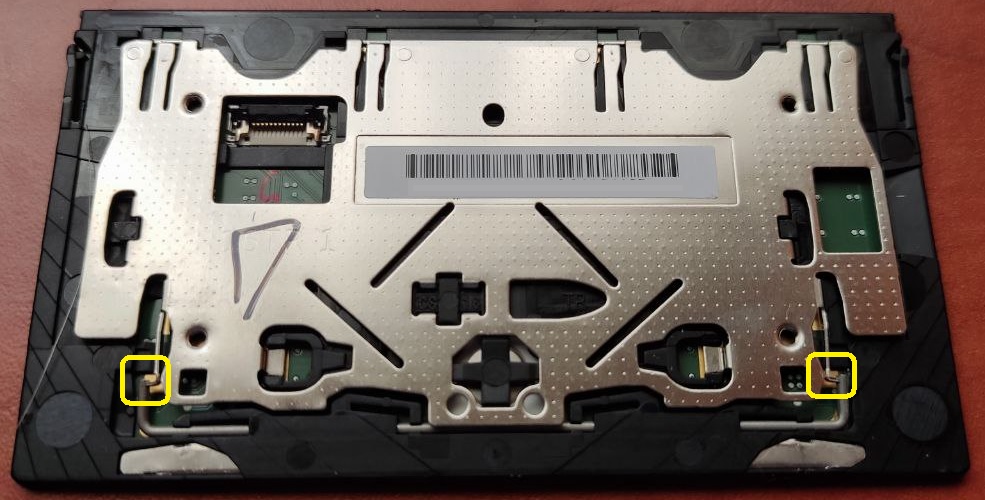
Note the two areas marked with yellow - there is a pair of L-shaped rods with tiny "ears" (for lack of better word) pushing against them. These create the tension that responds to pressure and generates the click action - one for each side. Sometimes (perhaps following a strong bump), the "ear" can slip under the rod, which pushes the entire assembly out of position, and at the same time blocks the click action. The fix it to simply push the "ear" into the correct position, which it naturally wants to do. You should be able to test that the click action is back to normal before putting everything back together.
The fact that the exact same thing happened to me on two different laptops (X1C5, TP25), and apparently also to the guy in this video on X1C6 (all three systems use the same touchpad part, albeit under different FRUs), suggest that it may be a characteristic weakness of this part. Fortunately, it does not seem to happen frequently, and is easy to remedy.
The same thing, BTW, happened to me a few years back when I was using a Thinkpad X1 Carbon Gen5. I fixed it then as well, but forgot to document.
Anyhow, the cause and fix is very simple, because on these models, it is rather easy to take out the trackpad.
(1) Enter the BIOS, in Power settings disable the built-in battery (precaution before every disassembly), the machine will power off
(2) Disconnect the external battery, remove the bottom cover (loosen 6 screws)
(3) Disconnect and remove the built-in battery (2 screws + cable connector), remove secondary RAM stick if present (only on TP25 - no such thing on X1 Carbon)
(4) Disconnect and touchpad (4 screws + flat cable connector) and extract it by pushing it through the top of the palmrest
The back (bottom) side of the touchpad looks like this:
Note the two areas marked with yellow - there is a pair of L-shaped rods with tiny "ears" (for lack of better word) pushing against them. These create the tension that responds to pressure and generates the click action - one for each side. Sometimes (perhaps following a strong bump), the "ear" can slip under the rod, which pushes the entire assembly out of position, and at the same time blocks the click action. The fix it to simply push the "ear" into the correct position, which it naturally wants to do. You should be able to test that the click action is back to normal before putting everything back together.
The fact that the exact same thing happened to me on two different laptops (X1C5, TP25), and apparently also to the guy in this video on X1C6 (all three systems use the same touchpad part, albeit under different FRUs), suggest that it may be a characteristic weakness of this part. Fortunately, it does not seem to happen frequently, and is easy to remedy.