


 Homepage
 Forum
Forum Drivers
 HMM-Manuals
 MTM
MTM Feed
Feed

Take a look at our
ThinkPads.com HOME PAGE
For those who might want to contribute to the blog, start here: Editors Alley Topic
Then contact Bill with a Private Message
ThinkPads.com HOME PAGE
For those who might want to contribute to the blog, start here: Editors Alley Topic
Then contact Bill with a Private Message
T440/p CLUNKPAD: Pics and installation of T450 Synaptics and Alps Touchpad+buttons Driver
Re: T440/p CLUNKPAD: Pics and installation of T450 Synaptics and Alps Touchpad+buttons Driver
I have replaced Synaptics touchpad from T450 to my T440s. I edited Synpd file like the tutorial saying, installing driver but after restart, 3 touchpad buttons didnt work. What should i do? What im doing wrong?
Re: T440/p CLUNKPAD: Pics and installation of T450 Synaptics and Alps Touchpad+buttons Driver
Longtime forum lurker here; just wanted to say "thanks." I recently upgraded my T440p with a Synaptics touchpad from a T450s using this guide. It's a tremendous improvement to the feel and functionality of the machine. I followed the steps to prevent Win 10 from updating my drivers, and everything worked perfectly.
Re: T440/p CLUNKPAD: Pics and installation of T450 Synaptics and Alps Touchpad+buttons Driver
Just updated to v2004...getting "Synaptics device not found!" any idea how to get around this and install the Synaptics T450 driver???
-
swatchie-1
- Posts: 1
- Joined: Thu Jun 11, 2020 8:14 am
- Location: Shah Alam, Malaysia
Re: T440/p CLUNKPAD: Pics and installation of T450 Synaptics and Alps Touchpad+buttons Driver
Hi having the same issue too. The 3 buttons are not working. Bought mine from the UK. Synaptics. How do we get it to work? Followed the instructions and installed the drivers.
-
crawlercrane
- Posts: 5
- Joined: Sun Jun 14, 2020 7:30 am
- Location: Brisbane, Australia
Re: T440/p CLUNKPAD: Pics and installation of T450 Synaptics and Alps Touchpad+buttons Driver
My T440p kept updating to the unmodified drivers that don't recognise the buttons. First time was because of Lenovo Vantage, which seems to ignore the group policy settings. If you have Vantage installed, make sure you turn off automatic updates. Then it happened again after windows updated to version 2004, regardless of having the group policy set to not do that. I just rolled it back to the previous version and it's working properly again, for now at least.
Re: T440/p CLUNKPAD: Pics and installation of T450 Synaptics and Alps Touchpad+buttons Driver
Didn't have any problems with unwanted update, drivers working like a charm from the first day I installed them.
Maybe there's some workaround, way of protecting driver files by setting them to read-only, system?
Maybe there's some workaround, way of protecting driver files by setting them to read-only, system?
T30(14" XGA, 12V car powered), A31p(UXGA IPS, 2nd HDD and battery), R50p(UXGA IPS), T43(IPS SXGA+, GPU desolder), T43p(UXGA IPS, dock, maxed out), T60(SXGA+ IPS) + second T60 IPS+dock+mods, T61p, T520, T430, T540p, X1 Carbon 5th gen, T590
-
crawlercrane
- Posts: 5
- Joined: Sun Jun 14, 2020 7:30 am
- Location: Brisbane, Australia
Re: T440/p CLUNKPAD: Pics and installation of T450 Synaptics and Alps Touchpad+buttons Driver
Well, I worked out why windows kept updating my drivers, regardless of my group policy settings - I'd mistakenly entered the device IDs under "Prevent installation of any devices that match any of these instance IDs". Should have been under the entry two lines above that "Prevent installation of any devices that match any of these IDs". Rookie mistake.
-
Listicetti
- Posts: 6
- Joined: Fri Aug 14, 2020 3:32 pm
- Location: Berlin, Germany
Re: T440/p CLUNKPAD: Pics and installation of T450 Synaptics and Alps Touchpad+buttons Driver
I'm afraid I did not succeed in following the above description. Besides the fact, that the newly (and properly) replaced Touch-/Trackpad is not recognized at all (and does not react in any way, no click, no touch), the Installation the rewrited Synaptic-Driver does not work out. The information is as follows:
https://postimg.cc/nMnChX26
https://postimg.cc/nMnChX26
-
crawlercrane
- Posts: 5
- Joined: Sun Jun 14, 2020 7:30 am
- Location: Brisbane, Australia
Re: T440/p CLUNKPAD: Pics and installation of T450 Synaptics and Alps Touchpad+buttons Driver
You need to allow for installation of unsigned drivers. There's some instructions for this in one of the posts above, but I found the easiest method is to go into Windows powershell (Admin) and enter
Bcdedit.exe -set TESTSIGNING off
then reboot. You should be able to install then drivers then. Don't forget to go back to powershell and enter
Bcdedit.exe -set TESTSIGNING on
When you're done.
Bcdedit.exe -set TESTSIGNING off
then reboot. You should be able to install then drivers then. Don't forget to go back to powershell and enter
Bcdedit.exe -set TESTSIGNING on
When you're done.
-
Listicetti
- Posts: 6
- Joined: Fri Aug 14, 2020 3:32 pm
- Location: Berlin, Germany
Re: T440/p CLUNKPAD: Pics and installation of T450 Synaptics and Alps Touchpad+buttons Driver
Thanks for the hint, managed to install the driver -- but appears, that the newly connected touchpad isn't recognized at all. Maybe I was supplied with a non-working piece or the cable is not working. I'm afraid, I can't do this myself.
-
RealBlackStuff
- Admin Emeritus

- Posts: 24724
- Joined: Mon Sep 18, 2006 5:17 am
- Location: Loch Garman, Éire
Re: T440/p CLUNKPAD: Pics and installation of T450 Synaptics and Alps Touchpad+buttons Driver
Try carefully reattaching the touchpad cable on both ends, make sure it is in STRAIGHT.
Lovely day for a Guinness! (The Real Black Stuff)
But I actually prefer Murphy's from Cork!
But I actually prefer Murphy's from Cork!
-
Listicetti
- Posts: 6
- Joined: Fri Aug 14, 2020 3:32 pm
- Location: Berlin, Germany
Re: T440/p CLUNKPAD: Pics and installation of T450 Synaptics and Alps Touchpad+buttons Driver
Followed the mechanical process again, reattached the cables -- it doesn't work.
The problem might be that I am using the old cable (in lack of a new one, which was not delivered with the touchpad), while the old clunkpad had NFC with a dedicated cable, while the new one hasn't?
https://i.postimg.cc/m2mb9x0M/DSC-0223.jpg
FORUM warning:
picture(s) WAY too big, tags removed. Please read the Forum Rules, especially Section 5: viewtopic.php?f=16&t=14339
The problem might be that I am using the old cable (in lack of a new one, which was not delivered with the touchpad), while the old clunkpad had NFC with a dedicated cable, while the new one hasn't?
https://i.postimg.cc/m2mb9x0M/DSC-0223.jpg
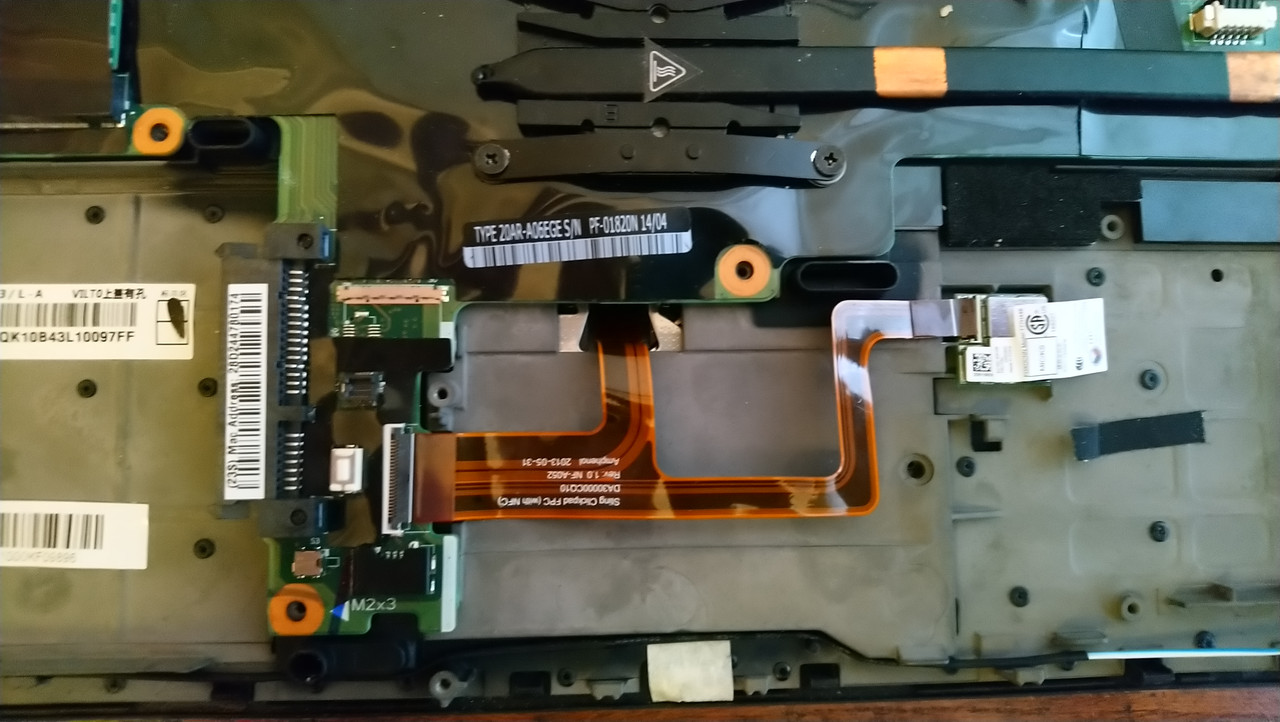
FORUM warning:
picture(s) WAY too big, tags removed. Please read the Forum Rules, especially Section 5: viewtopic.php?f=16&t=14339
-
RealBlackStuff
- Admin Emeritus
- Posts: 24724
- Joined: Mon Sep 18, 2006 5:17 am
- Location: Loch Garman, Éire
Re: T440/p CLUNKPAD: Pics and installation of T450 Synaptics and Alps Touchpad+buttons Driver
Try installing the Alps driver.
And try to not connect that NFC.
And try to not connect that NFC.
Lovely day for a Guinness! (The Real Black Stuff)
But I actually prefer Murphy's from Cork!
But I actually prefer Murphy's from Cork!
-
Listicetti
- Posts: 6
- Joined: Fri Aug 14, 2020 3:32 pm
- Location: Berlin, Germany
Re: T440/p CLUNKPAD: Pics and installation of T450 Synaptics and Alps Touchpad+buttons Driver
Tried that, didn't work out neither.
I will extend this troubleshoot now in purchasing another touchpad -- this time with a new cable. I will keep you updated with my ... progress?
I will extend this troubleshoot now in purchasing another touchpad -- this time with a new cable. I will keep you updated with my ... progress?
-
Listicetti
- Posts: 6
- Joined: Fri Aug 14, 2020 3:32 pm
- Location: Berlin, Germany
Re: T440/p CLUNKPAD: Pics and installation of T450 Synaptics and Alps Touchpad+buttons Driver
Now, after having destroyed the Windows-Key on the keyboard and having replaced the old Touchpad-NFC-cable with a new one, without NFC connection, everything works just fine! Thank you all! The feeling is great, may my T440s be a faithful companion for the upcoming years.
For all who may want to replace their Clunkpad in the future, my little contribution may be this: Make sure, that you replace an NFC/Touchpad cable with a Non-NFC/Touchpad cable if mounting a non-NFC touchpad.
Best wishes from Berlin
For all who may want to replace their Clunkpad in the future, my little contribution may be this: Make sure, that you replace an NFC/Touchpad cable with a Non-NFC/Touchpad cable if mounting a non-NFC touchpad.
Best wishes from Berlin
-
Listicetti
- Posts: 6
- Joined: Fri Aug 14, 2020 3:32 pm
- Location: Berlin, Germany
Re: T440/p CLUNKPAD: Pics and installation of T450 Synaptics and Alps Touchpad+buttons Driver
Ok, sorry, it's me again. Everythin worked fine -- until today, when the three keys or buttons as well as the trackpoint ceased working. I protected WIN10 from overwriting the drivers previously via the Group Policy Editor and there is no new driver I can recognise. The Synaptics settings via the mouse settings are there, I can still enable and disable the trackpoint, but that changes nothing. Any thoughts on this?
Thanks again from Berlin
Thanks again from Berlin
-
krzysiekedzio
- Posts: 2
- Joined: Sat Sep 05, 2020 2:11 am
- Location: Lodz, Poland
Re: T440/p CLUNKPAD: Pics and installation of T450 Synaptics and Alps Touchpad+buttons Driver
Hi everyone,
I have done all the instruction for synaptic touchpad, I have working 3 buttons (middle button scrolling) but unfortunatelly no two fingers scrolling which is one of my favourite feature
I dont even have synaptic overlap in mouse device window.
Does anyone have the same issue and figured out how to deal with it?
Best Regards
I have done all the instruction for synaptic touchpad, I have working 3 buttons (middle button scrolling) but unfortunatelly no two fingers scrolling which is one of my favourite feature
I dont even have synaptic overlap in mouse device window.
Does anyone have the same issue and figured out how to deal with it?
Best Regards
Re: T440/p CLUNKPAD: Pics and installation of T450 Synaptics and Alps Touchpad+buttons Driver
Hey krzysiekedzio,
I'm facing exacly the same issue. I can get 3 buttons to work on jbg218ww driver or similiar (I tried quite a few...) but I have no 2 finger scrolling working. If I revert drivers back to Genuine Windows ones I have 2 finger scrolling working fine, but not 3 buttons. I even installed fresh windows 10 pro x64 just an hour ago because of that, but that didn't help.
UPDATE:
Please follow this guy and use Enforced driver install method. It worked for me like a charm!
https://www.youtube.com/watch?v=iap3qJKpR84&t=310s
I'm facing exacly the same issue. I can get 3 buttons to work on jbg218ww driver or similiar (I tried quite a few...) but I have no 2 finger scrolling working. If I revert drivers back to Genuine Windows ones I have 2 finger scrolling working fine, but not 3 buttons. I even installed fresh windows 10 pro x64 just an hour ago because of that, but that didn't help.
UPDATE:
Please follow this guy and use Enforced driver install method. It worked for me like a charm!
https://www.youtube.com/watch?v=iap3qJKpR84&t=310s
-
krzysiekedzio
- Posts: 2
- Joined: Sat Sep 05, 2020 2:11 am
- Location: Lodz, Poland
Re: T440/p CLUNKPAD: Pics and installation of T450 Synaptics and Alps Touchpad+buttons Driver
Thank you for the answer, but what is the different between video and method described on the first page from this forum?
-
RealBlackStuff
- Admin Emeritus
- Posts: 24724
- Joined: Mon Sep 18, 2006 5:17 am
- Location: Loch Garman, Éire
Re: T440/p CLUNKPAD: Pics and installation of T450 Synaptics and Alps Touchpad+buttons Driver
Did you guys use the indicated W7/W8 jbgc28ww.exe driver and installed that as per instructions?
And did you stop W10 from screwing it up, also as per instructions?
And did you stop W10 from screwing it up, also as per instructions?
Lovely day for a Guinness! (The Real Black Stuff)
But I actually prefer Murphy's from Cork!
But I actually prefer Murphy's from Cork!
Re: T440/p CLUNKPAD: Pics and installation of T450 Synaptics and Alps Touchpad+buttons Driver
First of all: thanks so much for the detailed instructions RealBlackStuff! You are making the world a better place by enabling people to get rid of those clunkpads, haha.
@sulexis: I had a similar issue when replacing the clunkpad on my T440s with a Synaptics touchpad: with the drivers installed as instructed, the trackpoint option was greyed out and neither the trackpoint or the three trackpoint buttons worked.
It was all a bit peculiar: without installing drivers (only Win10 auto install driver) the trackpad was recognized as PS2 mouse in the device manager. The touchpad worked, the three trackpoint buttons worked but neither did the trackpoint nor scrolling (as expected) work. After taking all steps as described by RealBlackStuff, scrolling and the touchpad (including right and left click) worked but the trackpoint and trackpoint buttons didn't work.
After a few hours of trying different drivers and configurations I found the issue: the flex cable of the trackpoint had come undone during re-installation of the keyboard. Apparently that causes the Synaptics driver to disable all trackpoint function, including the three trackpoint buttons. After reconnecting the trackpoint cable, both trackpoint and trackpoint buttons worked without driver (but no scrolling obviously). Out of laziness I tried a simple installation of a driver that had been recommended to me by the supplier of the touchpad and all works like a charm!
The driver I'm using is n10gx25w (http://download.lenovo.com/ibmdl/pub/pc ... 0gx25w.exe).
Let's see if this is a longterm solution, otherwise I am sure the instructions posted above will work.
If anybody is struggling to find a German supplier of Synaptics trackpad: I was very satisfied buying it here: https://sperber.it/Trackpad-T440p-T450-T460
@sulexis: I had a similar issue when replacing the clunkpad on my T440s with a Synaptics touchpad: with the drivers installed as instructed, the trackpoint option was greyed out and neither the trackpoint or the three trackpoint buttons worked.
It was all a bit peculiar: without installing drivers (only Win10 auto install driver) the trackpad was recognized as PS2 mouse in the device manager. The touchpad worked, the three trackpoint buttons worked but neither did the trackpoint nor scrolling (as expected) work. After taking all steps as described by RealBlackStuff, scrolling and the touchpad (including right and left click) worked but the trackpoint and trackpoint buttons didn't work.
After a few hours of trying different drivers and configurations I found the issue: the flex cable of the trackpoint had come undone during re-installation of the keyboard. Apparently that causes the Synaptics driver to disable all trackpoint function, including the three trackpoint buttons. After reconnecting the trackpoint cable, both trackpoint and trackpoint buttons worked without driver (but no scrolling obviously). Out of laziness I tried a simple installation of a driver that had been recommended to me by the supplier of the touchpad and all works like a charm!
The driver I'm using is n10gx25w (http://download.lenovo.com/ibmdl/pub/pc ... 0gx25w.exe).
Let's see if this is a longterm solution, otherwise I am sure the instructions posted above will work.
If anybody is struggling to find a German supplier of Synaptics trackpad: I was very satisfied buying it here: https://sperber.it/Trackpad-T440p-T450-T460
Re: T440/p CLUNKPAD: Pics and installation of T450 Synaptics and Alps Touchpad+buttons Driver
has anyone been able to get this work w/ the latest windows 10 update (20H2 build 19042.685) [Thinkpad t440p]??? I've been holding out on updating cause it breaks the trackpad (2 finger scroll and the trackpad in general is fuct) (Synaptics). so frustrating....is there a workaround 
-
TPadModder
- Posts: 5
- Joined: Thu Jan 02, 2020 11:37 pm
- Location: Brisbane, Australia
Re: T440/p CLUNKPAD: Pictures of T450 Synaptics and Alps Touchpad+buttons
Thanks for the great guide!RealBlackStuff wrote: ↑Sat Sep 01, 2018 11:21 amHow to install a T450 Synaptics touchpad+buttons driver in a T440/T440p:
1. Download this W7/W8 Synaptics T450 driver from Lenovo, do not install yet!
==>> https://download.lenovo.com/pccbbs/mobiles/jbgc28ww.exe
2. Go to Control Panel\Programs and UNinstall your current Synaptics/Alps drivers
3. Reboot
4. Doubleclick the T450 driver you just downloaded, run it, but UNtick the option to install now.
--- It will unpack to C:\DRIVERS\Win\UNAV
5. Go to C:\DRIVERS\Win\UNAV\WinWDF\X64\SynPD.inf for 64-bit (or X86\SynPD.inf for 32-bit)
6. Edit SynPD.inf and
--- find and delete all lines with LEN0036 in it
--- find all lines with LEN200E and change LEN200E into LEN0036
--- save the file
LEN0036 is the T440 hardware ID for both clunkpad and touchpad+buttons.
LEN200E is the T450 hardware ID for the touchpad+buttons.
7. Go to C:\DRIVERS\Win\UNAV and doubleclick on Setup.exe
--- when Windows complains about unsigned stuff, click on "install anyway".
8. Reboot and enjoy!
9. ONLY if you run W10: go protect these W10 drivers against Micro$haft updates overwriting your hard work!
See similar instructions to replace the Clunkpad driver on the X240/s
I have found for me with a W540 with a W541 touchpad installed the hardware id is LEN0034. I followed the same process but with step 6 delete all LEN0034 lines and then replace LEN200E with LEN0034.
W530 i7 3740qm | T430 i7 3720qm with 1080p conversion | Thinkpad Yoga S1 |
Re: T440/p CLUNKPAD: Pics and installation of T450 Synaptics and Alps Touchpad+buttons Driver
Hi guys,
I have a query regarding an Alps touchpad. It's installed and operating correctly on the drivers suggested by RBS. If I go
to mouse properties, should there be a Thinkpad tab? Looking at post #31 by Sulexis he shows a picture of such
a tab. I've got a T400 and under mouse properties there's an UltraNav tab that enables you to adjust the touchpad settings.
The T400 has a Synaptics touchpad but I wondered if the Alps had similar adjustability?
Thanks in advance.
I have a query regarding an Alps touchpad. It's installed and operating correctly on the drivers suggested by RBS. If I go
to mouse properties, should there be a Thinkpad tab? Looking at post #31 by Sulexis he shows a picture of such
a tab. I've got a T400 and under mouse properties there's an UltraNav tab that enables you to adjust the touchpad settings.
The T400 has a Synaptics touchpad but I wondered if the Alps had similar adjustability?
Thanks in advance.
Re: T440/p CLUNKPAD: Pics and installation of T450 Synaptics and Alps Touchpad+buttons Driver
A youtuber claimed his t450 touchpad upgrade damaged his lcd screen, because the middle button on his t450 pad sticks up higher than on the stock 440p pad.
Other contributing factors include ,
1. worn out rubber pads on the screen lid.
2. putting pressure on the closed lid, like when you laptop is in a backpack.
i have just bought a t450 touchpad. it is a synaptic-clone. i am thinking of returning it due to the risk of damaging the screen. i have to do air travel, that means my laptop might sandwiched tightly in overhead bins.
and i am getting used to the buttonless touchpad. but 3 button is definitely better than buttonless. but the risk of damaging he lcd screen.
also, i wonder if there are differences in the height of he middle buttons with different models of touchpad.
i am thinking of a scientific way to measure the height of the middle button and the gap spacing with the lcd.
Other contributing factors include ,
1. worn out rubber pads on the screen lid.
2. putting pressure on the closed lid, like when you laptop is in a backpack.
i have just bought a t450 touchpad. it is a synaptic-clone. i am thinking of returning it due to the risk of damaging the screen. i have to do air travel, that means my laptop might sandwiched tightly in overhead bins.
and i am getting used to the buttonless touchpad. but 3 button is definitely better than buttonless. but the risk of damaging he lcd screen.
also, i wonder if there are differences in the height of he middle buttons with different models of touchpad.
i am thinking of a scientific way to measure the height of the middle button and the gap spacing with the lcd.
-
RealBlackStuff
- Admin Emeritus
- Posts: 24724
- Joined: Mon Sep 18, 2006 5:17 am
- Location: Loch Garman, Éire
Re: T440/p CLUNKPAD: Pics and installation of T450 Synaptics and Alps Touchpad+buttons Driver
Anybody following my Clunkpad instructions should see this as the very first thing in this thread:
To 'scientifically' measure the button height, you could use various thickness thermal pads.
The buttons would make an imprint if they get 'squashed' between LCD and pad.
I haven't seen this warning anywhere else.PLEASE NOTE:
BEFORE YOU PUT IN THE NEW TOUCHPAD, INSTALL SOME EXTRA BUMPERS/RUBBERS ALONG THE TOP OF THE LID, LEFT AND RIGHT OF THE WEBCAM.
THESE SHOULD BE ABOUT TWICE AS THICK/HIGH AS THE SMALL BUMPERS THAT ARE THERE ALREADY.
Recommended size ~WxH: ~6 x 2 mm or ~1/4 x 5/64 inch.
PLACE THEM IMMEDIATELY LEFT AND RIGHT OF THE EXISTING BUMPERS.
FAILURE TO DO SO WILL RESULT IN SCRATCH MARKS ON THE SCREEN FROM THE NEW BUTTONS!
To 'scientifically' measure the button height, you could use various thickness thermal pads.
The buttons would make an imprint if they get 'squashed' between LCD and pad.
Lovely day for a Guinness! (The Real Black Stuff)
But I actually prefer Murphy's from Cork!
But I actually prefer Murphy's from Cork!
Re: T440/p CLUNKPAD: Pics and installation of T450 Synaptics and Alps Touchpad+buttons Driver
there are also two rubber bumpers on the sides of the screen. i would also add taller bumpers there too.
otherwise, there might not be enough support for the screen, and cause flex on the screen.
otherwise, there might not be enough support for the screen, and cause flex on the screen.
-
RealBlackStuff
- Admin Emeritus
- Posts: 24724
- Joined: Mon Sep 18, 2006 5:17 am
- Location: Loch Garman, Éire
Re: T440/p CLUNKPAD: Pics and installation of T450 Synaptics and Alps Touchpad+buttons Driver
[Untested by me] claim to improve T450 Synaptics on a T440P under Windows 10: https://github.com/zjquid/t440p_fix
Lovely day for a Guinness! (The Real Black Stuff)
But I actually prefer Murphy's from Cork!
But I actually prefer Murphy's from Cork!
Re: T440/p CLUNKPAD: Pics and installation of T450 Synaptics and Alps Touchpad+buttons Driver
Hey guys,
I ran into a problem. I have a T440 (s maybe) and installed the T450 trackpad. So far so good, it worked pretty good.
BUT I can't get the trackpoint running under Windows 10, I tried all tricks out there but I wasn't able to get it working.
Is there anything else I can try ?
I ran into a problem. I have a T440 (s maybe) and installed the T450 trackpad. So far so good, it worked pretty good.
BUT I can't get the trackpoint running under Windows 10, I tried all tricks out there but I wasn't able to get it working.
Is there anything else I can try ?
Re: T440/p CLUNKPAD: Pics and installation of T450 Synaptics and Alps Touchpad+buttons Driver
Greetings RBS. My t440p has a knock off synaptics t450 pad and the driver mods with gpedit update block and has worked fine for over 18 months. Did a fresh install of win10 pro as soon to sell it (that's another story) and decided to try the registry hack in your link above - I allowed lenov vantage to install the latest ultranav driver, prepared the .reg file and click - fully functioning trackpad and pointer with no driver mods. Surprised me - I was prepared to be disappointed and ready to go back the modded synpd method.RealBlackStuff wrote: ↑Mon Mar 08, 2021 3:02 am[Untested by me] claim to improve T450 Synaptics on a T440P under Windows 10: https://github.com/zjquid/t440p_fix
So far so good. I'm wondering whether the next driver update will break it?? I'm not doing gpedit to see.
BTW - this hack has been around a while - https://blogs.ethz.ch/heim/2017/01/02/e ... t-buttons/ - January 2017
T430 ips, T440p.
-
- Similar Topics
- Replies
- Views
- Last post
-
-
T450 Will Not Power Up
by shajoe44 » Mon Nov 10, 2025 8:23 pm » in ThinkPad T430-T495 / T530-T590 Series - 2 Replies
- 3967 Views
-
Last post by quietude38
Fri Jan 23, 2026 11:37 am
-
-
-
Disable Touchpad on ThinkPad T490?
by Clueless in Seattle » Tue Jan 20, 2026 9:57 pm » in ThinkPad T430-T495 / T530-T590 Series - 3 Replies
- 3878 Views
-
Last post by dcfbf
Sun Feb 08, 2026 1:41 am
-
-
-
T420 Lid Sensor Trigger Location? (WARNING: PICS)
by T_B » Fri Jan 16, 2026 11:08 pm » in ThinkPad T400/T410/T420 and T500/T510/T520 Series - 2 Replies
- 4907 Views
-
Last post by T_B
Mon Jan 19, 2026 11:24 pm
-
-
-
ThinkPad 25 replica build log *WARNING: PICS*
by hidde-j » Tue Mar 24, 2026 4:20 pm » in Thinkpad T25 Anniversary/Retro - 3 Replies
- 1494 Views
-
Last post by hidde-j
Thu Mar 26, 2026 4:49 pm
-
Who is online
Users browsing this forum: No registered users and 39 guests