Take a look at our
ThinkPads.com HOME PAGE
For those who might want to contribute to the blog, start here: Editors Alley Topic
Then contact Bill with a Private Message

S230U annoying bios pop up screen

Performance, hardware, software, general buying and gaming discussion..
Post Reply
Message
Author
kovacz
Posts: 2
Joined: Fri Sep 11, 2015 3:31 am
Location: Cape Town, South Africa

S230U annoying bios pop up screen

#1 Post by kovacz » Fri Sep 11, 2015 3:41 am

Hi All

I recently installed a new HDD in my Thinkpad Twist.

The install went fine and Windows loads but everytime i restart I get this annoying Bios boot menu pop up screen.
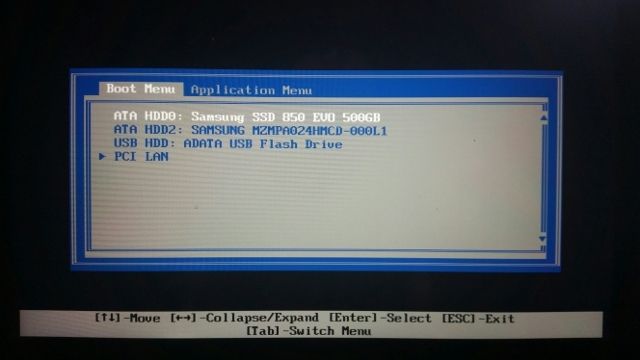
Image

Ive gone through all the settings in the bios to get rid of this screen but it wont quit.

Ive even disabled ALL other boot devices except the HDD and it still pops up with the message when restarting.

Im clearly missing something because before I fiddled with the bios it didnt prompt me.

Any help would be greatly appreciated :)

axur-delmeria
Senior ThinkPadder
Senior ThinkPadder
Posts: 4413
Joined: Mon May 28, 2012 5:49 am
Location: Metro Manila, Philippines

Re: S230U annoying bios pop up screen

#2 Post by axur-delmeria » Fri Sep 11, 2015 4:09 am

Maybe a BIOS option like "Boot selection at startup Enable/disable" ?
Planned Purchase: T480s i5-8350 FHD Touch
Impulse Buy: Thinkpad not named for safety reasons :lol:
RIP: X220 4291-C91 X61 7676-A24 760XD-U9E :cry:

kovacz
Posts: 2
Joined: Fri Sep 11, 2015 3:31 am
Location: Cape Town, South Africa

Re: S230U annoying bios pop up screen

#3 Post by kovacz » Fri Sep 11, 2015 5:02 am

Hi There, thanks for the reply.

Couldnt find a setting like that.

But eventually enough fiddling got it working.

Still not sure what i did :?

Post Reply
  • Similar Topics
    Replies
    Views
    Last post

Return to “Thinkpad - General HARDWARE/SOFTWARE questions”

Who is online

Users browsing this forum: No registered users and 34 guests