


 Homepage
 Forum
Forum Drivers
 HMM-Manuals
 MTM
MTM Feed
Feed
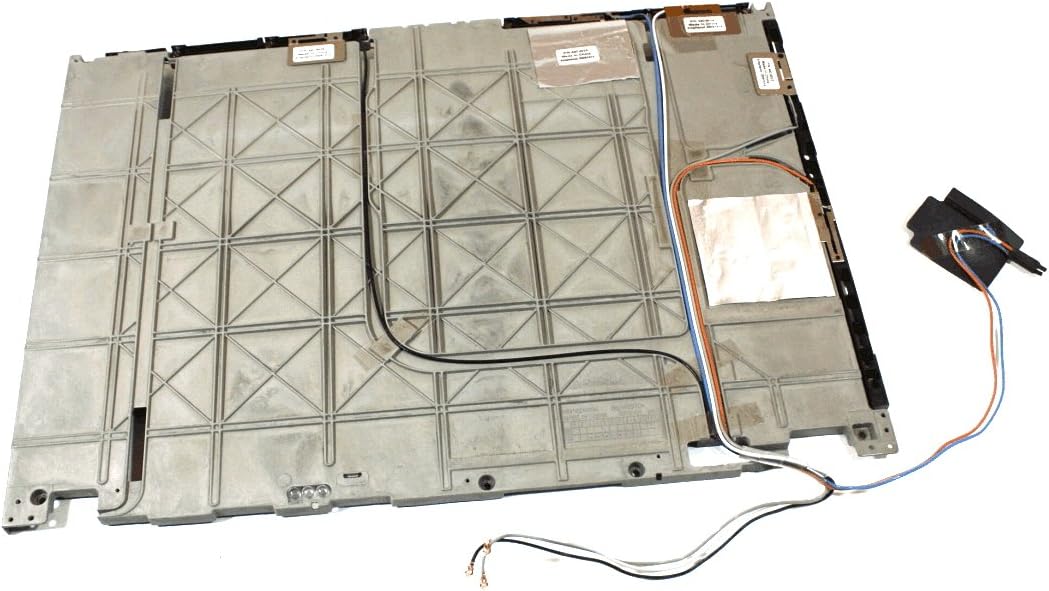
so there are some wires pre-installed at the back of the Lcd, but what could this empty space be on the left here?
(right-side wires are for the Wan card, so 1 of them might be for Gps also? or is the Gps wire the one that is missing?)
https://images-na.ssl-images-amazon.com ... L1200_.jpg
Take a look at our
ThinkPads.com HOME PAGE
For those who might want to contribute to the blog, start here: Editors Alley Topic
Then contact Bill with a Private Message
ThinkPads.com HOME PAGE
For those who might want to contribute to the blog, start here: Editors Alley Topic
Then contact Bill with a Private Message
w500 antenna wires?
-
screenshot
- Freshman Member
- Posts: 59
- Joined: Thu Jul 02, 2020 7:38 am
- Location: EU, Helsinki
-
screenshot
- Freshman Member
- Posts: 59
- Joined: Thu Jul 02, 2020 7:38 am
- Location: EU, Helsinki
Re: w500 antenna wires?
would it also be possible to cut some holes on the sides of the Lcd screen case and then add some external Gps and 3g antenna ipex-mhf/sma connectors into it?
like just run some extra wire from the "antenna"s metal strip thing into the extra ipex connector?
like just run some extra wire from the "antenna"s metal strip thing into the extra ipex connector?
Last edited by screenshot on Sat Jul 04, 2020 2:54 pm, edited 1 time in total.
-
screenshot
- Freshman Member
- Posts: 59
- Joined: Thu Jul 02, 2020 7:38 am
- Location: EU, Helsinki
Re: w500 antenna wires?
well, that empty groove might just be for t500 and r500 white wifi wire, but maybe i can add some extra Gps wire for the w500 then?
or which color wire is used for the Gps on w500?
or which color wire is used for the Gps on w500?
-
screenshot
- Freshman Member
- Posts: 59
- Joined: Thu Jul 02, 2020 7:38 am
- Location: EU, Helsinki
Re: w500 antenna wires?
and wonder what is the dbi gain on the original antennas? then i could replace them with some new ones with +8dbi gain or smth...
-
screenshot
- Freshman Member
- Posts: 59
- Joined: Thu Jul 02, 2020 7:38 am
- Location: EU, Helsinki
Re: w500 antenna wires?
this t500 seems to have this extra white wire installed, but wonder what is it for even?
http://www.technologyguide.com/wp-conte ... /36024.jpg
its basically located where the turbomemory usually is...
plus i noticed that there is actually no hole on the right side of the screen for the wire to go into the hinge, so i probably have to drill one into it?
http://www.technologyguide.com/wp-conte ... /36024.jpg
its basically located where the turbomemory usually is...
plus i noticed that there is actually no hole on the right side of the screen for the wire to go into the hinge, so i probably have to drill one into it?

Re: w500 antenna wires?
That wire is for wireless USB.
https://support.lenovo.com/us/en/solutions/migr-71355
https://i0.wp.com/the620guy.com/wp-cont ... 1200&ssl=1
Why do you want to equip this though? It's an obsolete technology of no advantage when there are much more convenient alternatives available.
https://support.lenovo.com/us/en/solutions/migr-71355
https://i0.wp.com/the620guy.com/wp-cont ... 1200&ssl=1
Why do you want to equip this though? It's an obsolete technology of no advantage when there are much more convenient alternatives available.
sent from my iPhone
Registry Tweak To Enable 2 Finger Scroll On Old Synaptics Touchpads
Registry Tweak To Enable 2 Finger Scroll On Old Synaptics Touchpads
-
screenshot
- Freshman Member
- Posts: 59
- Joined: Thu Jul 02, 2020 7:38 am
- Location: EU, Helsinki
Re: w500 antenna wires?
alternatives? and what is wireless usb lol
-
screenshot
- Freshman Member
- Posts: 59
- Joined: Thu Jul 02, 2020 7:38 am
- Location: EU, Helsinki
Re: w500 antenna wires?
well... i should probably add an extra antenna anyway, but what is the antenna cable and it's connectors called, so i could look them up somewhere? (and how many ohms should a Gps cable be?)
and is it even possible to attach so small connectors to this small cable at home at all?
the length should probably be ~2+24+3+2.5+16+26=73,5 cm, going through the middle tracks, under the keyboard...
and is it even possible to attach so small connectors to this small cable at home at all?
the length should probably be ~2+24+3+2.5+16+26=73,5 cm, going through the middle tracks, under the keyboard...



Re: w500 antenna wires?
The antennas are identified as FRU 44C5386 or 44C5387, according to the hardware maintenance manual for the T500 and the W500.
The connectors that are used on these antennas, are Hirose U.FL connectors. Do not confuse them with IPEX MHF4 connectors, as those are smaller and are not cross-compatible. As for the ohm rating, I believe that they should be within the 50-ohm range.
Wireless USB? It is old tech, something that was sort of dead right after it was introduced. For starters, the range was very much laughable, but the speed was promising as it was technically the wireless variant of USB 2.0. Main issue was that you needed a Wireless USB-capable device to get it to work, and if you did not, you would need a Wireless USB hub (example: Belkin F5U302ea). Considering the fact that most Wireless USB-capable devices are either long gone, or just outright unobtainable, you would be better off without it.
Here is a much, much better alternative that is way more common: Bluetooth. Seriously.
The connectors that are used on these antennas, are Hirose U.FL connectors. Do not confuse them with IPEX MHF4 connectors, as those are smaller and are not cross-compatible. As for the ohm rating, I believe that they should be within the 50-ohm range.
Wireless USB? It is old tech, something that was sort of dead right after it was introduced. For starters, the range was very much laughable, but the speed was promising as it was technically the wireless variant of USB 2.0. Main issue was that you needed a Wireless USB-capable device to get it to work, and if you did not, you would need a Wireless USB hub (example: Belkin F5U302ea). Considering the fact that most Wireless USB-capable devices are either long gone, or just outright unobtainable, you would be better off without it.
Here is a much, much better alternative that is way more common: Bluetooth. Seriously.
Re: w500 antenna wires?
Or NAS.
sent from my iPhone
Registry Tweak To Enable 2 Finger Scroll On Old Synaptics Touchpads
Registry Tweak To Enable 2 Finger Scroll On Old Synaptics Touchpads
-
- Similar Topics
- Replies
- Views
- Last post
-
-
ThinkPad W500 Replacement "TAB" Keycap (I-39 Style)
by Commando303 » Wed Nov 19, 2025 11:27 am » in ThinkPad W500/W510/W520 and W700/W701 Series - 1 Replies
- 6693 Views
-
Last post by Commando303
Fri Nov 21, 2025 7:44 am
-
Who is online
Users browsing this forum: No registered users and 51 guests