


 Homepage
 Forum
Forum Drivers
 HMM-Manuals
 MTM
MTM Feed
Feed
I don't have a smart phone nor don't have a use for one. My last phone I had 2006 - 2023 was a Motorola Razr V3m "Verizon" Silver model "2005-2006" AT&T" Black Model Not counting this one. The phone went through 3 OEM batteries in its entire life and the last battery was still going strong before Verizon forced me to upgrade or have account shutdown due to them shutting off the 3G network. I only had 4-5 phone options to pick from "Off brand names that I never heard of" and no phones from Motorola, so I went with the only name brand I know and was Nokia.
Nokia 2720Z Flip. It was thicker and bigger than my Thin sleek Razr V3m. It uses Micro USB and not USB-C, requires a Micro SIM card. Another reason Verizon wouldn't let me use it anymore due to no SIM. My AT&T Black model did have a SIM. 2GB Micro SD card was the max supported on my Razr and I swapped it into the Nokia. Not sure of its max supported card size on Nokia. I use the phone to make calls and that is it. Maybe get a text here and there. Phone has Internet but it is worthless, and its browser is not supported nor updated. I don't use it anyway. I pay Verizon $40 a month.
The reason I am talking about the phone issue is my work requires me to use Microsoft products and I am using my ThinkPad "Simple ThinkPad T450 with Windows 10 Pro" I have an Outlook account but they want me to use the company one and I need Microsoft Authenticator. But in order to use it I need to scan the QR code and download it to the phone "Smartphone" to get a code and then can enter it on my ThinkPad to access my email. So, I really need a device to just receive a code and as stated before I don't use my phone really and I don't want to spend around $80 to $120+ per month to just have a smartphone. Use to pay $20 a month for my Verizon bill back then but they kept upping the bill fees over the years and no new device added. So to add I live paycheck to paycheck and can't really afford to have a bill go from $40 to $120 per month.
Take a look at our
ThinkPads.com HOME PAGE
For those who might want to contribute to the blog, start here: Editors Alley Topic
Then contact Bill with a Private Message
ThinkPads.com HOME PAGE
For those who might want to contribute to the blog, start here: Editors Alley Topic
Then contact Bill with a Private Message
iPhone or Android for work
-
ThinkPad560X
- ThinkPadder

- Posts: 1274
- Joined: Fri Mar 13, 2009 2:47 am
- Location: New Alexandria, Pennsylvania
iPhone or Android for work
IBM: 760XD,770Z,600X,240,560X,560Z,570,380Z,390X,i1200,i1400,
A22m,A22e,A30,G40,R31,R40,R50,R60,R61,R400,R500,
T20,T23,T30,T40,T43,T60,T61,T400,T400s,T500,W500,W700,
X21,X30,X41,X41T,X60,X60T,X200,X200T,X300,X120e,Z60m,Z61t
T410|T510 to T480|T580
L440|L450 to L480|L580
X220 - X280
A22m,A22e,A30,G40,R31,R40,R50,R60,R61,R400,R500,
T20,T23,T30,T40,T43,T60,T61,T400,T400s,T500,W500,W700,
X21,X30,X41,X41T,X60,X60T,X200,X200T,X300,X120e,Z60m,Z61t
T410|T510 to T480|T580
L440|L450 to L480|L580
X220 - X280
-
RealBlackStuff
- Admin Emeritus

- Posts: 24730
- Joined: Mon Sep 18, 2006 5:17 am
- Location: Loch Garman, Éire
Re: iPhone or Android for work
How about an Amazon Kindle tablet?
I bought a used Fire HD 8 10th Gen. (32GB RAM, NO ads) on eBay for about $75.
It's Fire-OS is an Android OS.
Then I installed Google Play Store on it using this.
You can now install that M$-app on the Kindle, no phone bills ever!
As an aside: stop hoarding Thinkpads and sell off the ones you never use.
You'd be amazed at the money that now becomes available...
I bought a used Fire HD 8 10th Gen. (32GB RAM, NO ads) on eBay for about $75.
It's Fire-OS is an Android OS.
Then I installed Google Play Store on it using this.
You can now install that M$-app on the Kindle, no phone bills ever!
As an aside: stop hoarding Thinkpads and sell off the ones you never use.
You'd be amazed at the money that now becomes available...
Lovely day for a Guinness! (The Real Black Stuff)
But I actually prefer Murphy's from Cork!
But I actually prefer Murphy's from Cork!

Re: iPhone or Android for work
For simplicity's sake iPhone. Yes it's a walled system trying to suck you into subscriptions but guess what, everything is. Just exercise restraint with what you install. I use MS authenticator all day long.

Re: iPhone or Android for work
Can't your company figure out a way to send the authentication code using traditional SMS? That's how it is in my company (we use Microsoft Azure).ThinkPad560X wrote: ↑Wed Sep 25, 2024 11:38 pmThe reason I am talking about the phone issue is my work requires me to use Microsoft products and I am using my ThinkPad "Simple ThinkPad T450 with Windows 10 Pro" I have an Outlook account but they want me to use the company one and I need Microsoft Authenticator. But in order to use it I need to scan the QR code and download it to the phone "Smartphone" to get a code and then can enter it on my ThinkPad to access my email.
Thinkpad 25 (20K7), T16 Gen 3 (21MQ), Yoga 14 (20FY), T430s (IPS FHD + Classic Keyboard), X220 4291-4BG
X61 7673-V2V, T60 2007-QPG, T42 2373-F7G, X32 (IPS Screen), A31p w/ Ultrabay Numpad
X61 7673-V2V, T60 2007-QPG, T42 2373-F7G, X32 (IPS Screen), A31p w/ Ultrabay Numpad
-
ThinkPad560X
- ThinkPadder
- Posts: 1274
- Joined: Fri Mar 13, 2009 2:47 am
- Location: New Alexandria, Pennsylvania
Re: iPhone or Android for work
No, they will not do it. someone said something about bluestacks.dr_st wrote: ↑Thu Sep 26, 2024 4:23 amCan't your company figure out a way to send the authentication code using traditional SMS? That's how it is in my company (we use Microsoft Azure).ThinkPad560X wrote: ↑Wed Sep 25, 2024 11:38 pmThe reason I am talking about the phone issue is my work requires me to use Microsoft products and I am using my ThinkPad "Simple ThinkPad T450 with Windows 10 Pro" I have an Outlook account but they want me to use the company one and I need Microsoft Authenticator. But in order to use it I need to scan the QR code and download it to the phone "Smartphone" to get a code and then can enter it on my ThinkPad to access my email.
IBM: 760XD,770Z,600X,240,560X,560Z,570,380Z,390X,i1200,i1400,
A22m,A22e,A30,G40,R31,R40,R50,R60,R61,R400,R500,
T20,T23,T30,T40,T43,T60,T61,T400,T400s,T500,W500,W700,
X21,X30,X41,X41T,X60,X60T,X200,X200T,X300,X120e,Z60m,Z61t
T410|T510 to T480|T580
L440|L450 to L480|L580
X220 - X280
A22m,A22e,A30,G40,R31,R40,R50,R60,R61,R400,R500,
T20,T23,T30,T40,T43,T60,T61,T400,T400s,T500,W500,W700,
X21,X30,X41,X41T,X60,X60T,X200,X200T,X300,X120e,Z60m,Z61t
T410|T510 to T480|T580
L440|L450 to L480|L580
X220 - X280
-
ThinkPad560X
- ThinkPadder
- Posts: 1274
- Joined: Fri Mar 13, 2009 2:47 am
- Location: New Alexandria, Pennsylvania
Re: iPhone or Android for work
I forgot I had Sony Xperia z2 laying around. I got it to replace my broken Sony digital camera how many years ago. Put it on the charge since it was fully dead.
I went through with getting the QR code and scanned it only to see this before I can download Microsoft Authenticator. "Your Device isn't compatible with this version" And I can't upgrade to a newer Android version. This is why I don't care for smartphones. They only support them for 3-4 years with the OS and then tell you to get a new phone again.
I may see about getting a used iPhone. I hate how there is no options other than get Apple or Android. And I don't want to have all these accounts such as a Gmail, Apple ID. I picked Microsoft back in the 90s with Hotmail "now Outlook" I did see their Windows Phones, but they flopped and sold it.
I don't use Amazon either nor Facebook. I am an online hermit. The next brand I know would be Apple so may just get the iPhone. I still have an Apple Quadra 700 and a Powerbook G3.
I went through with getting the QR code and scanned it only to see this before I can download Microsoft Authenticator. "Your Device isn't compatible with this version" And I can't upgrade to a newer Android version. This is why I don't care for smartphones. They only support them for 3-4 years with the OS and then tell you to get a new phone again.
I may see about getting a used iPhone. I hate how there is no options other than get Apple or Android. And I don't want to have all these accounts such as a Gmail, Apple ID. I picked Microsoft back in the 90s with Hotmail "now Outlook" I did see their Windows Phones, but they flopped and sold it.
I don't use Amazon either nor Facebook. I am an online hermit. The next brand I know would be Apple so may just get the iPhone. I still have an Apple Quadra 700 and a Powerbook G3.
IBM: 760XD,770Z,600X,240,560X,560Z,570,380Z,390X,i1200,i1400,
A22m,A22e,A30,G40,R31,R40,R50,R60,R61,R400,R500,
T20,T23,T30,T40,T43,T60,T61,T400,T400s,T500,W500,W700,
X21,X30,X41,X41T,X60,X60T,X200,X200T,X300,X120e,Z60m,Z61t
T410|T510 to T480|T580
L440|L450 to L480|L580
X220 - X280
A22m,A22e,A30,G40,R31,R40,R50,R60,R61,R400,R500,
T20,T23,T30,T40,T43,T60,T61,T400,T400s,T500,W500,W700,
X21,X30,X41,X41T,X60,X60T,X200,X200T,X300,X120e,Z60m,Z61t
T410|T510 to T480|T580
L440|L450 to L480|L580
X220 - X280
Re: iPhone or Android for work
I've been 'in' telecoms for 20 years and for the last 14 or so I've been harping on about how insecure they are - somewhat behind the times, particularly when it comes to spoofing phone numbers on calls and texts. I also suspect the mobile operators never factored into their budgets becoming a second line of defence for a million different personal finance and tech companies. This somewhat increases the spotlight on their infrastructure from all the bad actors trying to defraud the rest of the world's computer users.
With all this in mind, I'm not surprised *some* IT departments are looking for something above and beyond SMS, which was never designed to be a security measure.
With all this in mind, I'm not surprised *some* IT departments are looking for something above and beyond SMS, which was never designed to be a security measure.
-
ThinkPad560X
- ThinkPadder
- Posts: 1274
- Joined: Fri Mar 13, 2009 2:47 am
- Location: New Alexandria, Pennsylvania
Re: iPhone or Android for work
I do use them. I sold off ThinkPads such as 4 701C, 700C, 700T, 755CD, 600, Transnote, s30, 360cS and more many years ago. Mostly 90s ThinkPads. And kept my ones I can use. I stopped collecting at TXL-x80 ThinkPads and don't really plan to get anymore. Plus most new PCs are going to be coming with built in AI and would rather stay with older machines.RealBlackStuff wrote: ↑Thu Sep 26, 2024 12:17 amAs an aside: stop hoarding Thinkpads and sell off the ones you never use.
You'd be amazed at the money that now becomes available...
And now in the U.S. if you sell and make $600 or more "Think it use to be $7,500.00 or more" the IRS considers you a business and you have to fill out a form. It says it doesn't matter if you sell items online or even a yard sale. If make $600 or more, you own us "IRS" taxes. And to make more, they lowered all the way down to $600. So, I quit refurbishing ThinkPads years ago and quit selling online. Anyway to get more money out of people trying to get by.
IBM: 760XD,770Z,600X,240,560X,560Z,570,380Z,390X,i1200,i1400,
A22m,A22e,A30,G40,R31,R40,R50,R60,R61,R400,R500,
T20,T23,T30,T40,T43,T60,T61,T400,T400s,T500,W500,W700,
X21,X30,X41,X41T,X60,X60T,X200,X200T,X300,X120e,Z60m,Z61t
T410|T510 to T480|T580
L440|L450 to L480|L580
X220 - X280
A22m,A22e,A30,G40,R31,R40,R50,R60,R61,R400,R500,
T20,T23,T30,T40,T43,T60,T61,T400,T400s,T500,W500,W700,
X21,X30,X41,X41T,X60,X60T,X200,X200T,X300,X120e,Z60m,Z61t
T410|T510 to T480|T580
L440|L450 to L480|L580
X220 - X280
-
RealBlackStuff
- Admin Emeritus
- Posts: 24730
- Joined: Mon Sep 18, 2006 5:17 am
- Location: Loch Garman, Éire
Re: iPhone or Android for work
What about the tablet I suggested?
Lovely day for a Guinness! (The Real Black Stuff)
But I actually prefer Murphy's from Cork!
But I actually prefer Murphy's from Cork!
-
ThinkPad560X
- ThinkPadder
- Posts: 1274
- Joined: Fri Mar 13, 2009 2:47 am
- Location: New Alexandria, Pennsylvania
Re: iPhone or Android for work
I don't use Amazon.
IBM: 760XD,770Z,600X,240,560X,560Z,570,380Z,390X,i1200,i1400,
A22m,A22e,A30,G40,R31,R40,R50,R60,R61,R400,R500,
T20,T23,T30,T40,T43,T60,T61,T400,T400s,T500,W500,W700,
X21,X30,X41,X41T,X60,X60T,X200,X200T,X300,X120e,Z60m,Z61t
T410|T510 to T480|T580
L440|L450 to L480|L580
X220 - X280
A22m,A22e,A30,G40,R31,R40,R50,R60,R61,R400,R500,
T20,T23,T30,T40,T43,T60,T61,T400,T400s,T500,W500,W700,
X21,X30,X41,X41T,X60,X60T,X200,X200T,X300,X120e,Z60m,Z61t
T410|T510 to T480|T580
L440|L450 to L480|L580
X220 - X280
Re: iPhone or Android for work
The Nokia 2720 Flip has a camera, but i don't know whether there is an app for scanning QR-codes.
As to choosing between Apple and Android, i suggest Android. I had to get a new phone for the same reason as you - my network operator shut down the 3G network, so i needed a VoLTE (voice over LTE) capable phone. If i would have to buy a new Android phone today, i might buy a Google Pixel 8a. Google provides operating system and security updates for seven years for these phones, i.e. they get OS and security updates until May 2031. The Pixel 8a hadn't been released at the time i had to get a new phone, so i got the cheapest contemporary Sony Xperia.
As to choosing between Apple and Android, i suggest Android. I had to get a new phone for the same reason as you - my network operator shut down the 3G network, so i needed a VoLTE (voice over LTE) capable phone. If i would have to buy a new Android phone today, i might buy a Google Pixel 8a. Google provides operating system and security updates for seven years for these phones, i.e. they get OS and security updates until May 2031. The Pixel 8a hadn't been released at the time i had to get a new phone, so i got the cheapest contemporary Sony Xperia.
Last edited by TTY on Thu Sep 26, 2024 12:22 pm, edited 1 time in total.
-
RealBlackStuff
- Admin Emeritus
- Posts: 24730
- Joined: Mon Sep 18, 2006 5:17 am
- Location: Loch Garman, Éire
Re: iPhone or Android for work
An Amazon account doesn't cost anything...
But any cell/mobile account does!
But any cell/mobile account does!
Lovely day for a Guinness! (The Real Black Stuff)
But I actually prefer Murphy's from Cork!
But I actually prefer Murphy's from Cork!

Re: iPhone or Android for work
Back when I worked my work provided me an android phone. I airgapped it so it only functioned on the work network. My responsibilities were not on-call.
iPhone is the least-nonsensical overall product I own. ThinkPad takes 2nd place because I have to set the darn thing up with a custom OS config, Windows or Linux, either takes admin intervention to get sorted out. iPhone just worksTM. More bad is my car, so much blood sweat and tears. Worst of all time is sorting out my life inbetween disorders and environmental adversities. Without my car, iPhone, and ThinkPads, I would not be alive
iPhone is the least-nonsensical overall product I own. ThinkPad takes 2nd place because I have to set the darn thing up with a custom OS config, Windows or Linux, either takes admin intervention to get sorted out. iPhone just worksTM. More bad is my car, so much blood sweat and tears. Worst of all time is sorting out my life inbetween disorders and environmental adversities. Without my car, iPhone, and ThinkPads, I would not be alive
sent from my iPhone
Registry Tweak To Enable 2 Finger Scroll On Old Synaptics Touchpads
Registry Tweak To Enable 2 Finger Scroll On Old Synaptics Touchpads

Re: iPhone or Android for work
Can't you borrow a phone from a friend to do what you need, then go back to the Nokia? You should probably figure out what you need for it to work since the Sony did not. I've got an unlocked Motorola G7(circa 2019) running Android 10, but no more updates, that's been sitting on my living room window sill since I bought my Pixel 2022. If you want to pick up the shipping, I'll mail it to you, after I wipe it of course. It just needs a sim card:
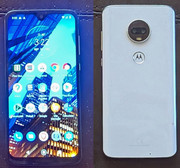
On a side note, I'd suggest checking out Tello. They have plans that start at $5 a month that'll get you 100 minutes a month of talk time and free texting. You won't get any data, but WiFi would still work and you can get more minutes or data if needed in $1 increments per month. I don't know if your Nokia is unlocked, but if not, you'd probably need an unlocked phone.
On a side note, I'd suggest checking out Tello. They have plans that start at $5 a month that'll get you 100 minutes a month of talk time and free texting. You won't get any data, but WiFi would still work and you can get more minutes or data if needed in $1 increments per month. I don't know if your Nokia is unlocked, but if not, you'd probably need an unlocked phone.
ThinkPad L14 - 2.1GHz Ryzen 4650U | 16GB | 256GB | 14" FHD | Win11P
ProBook 470 G5 - 1.6GHz Core i5 | 16GB | 2.2TB | 17" FHD | Mint
ProBook 470 G5 - 1.6GHz Core i5 | 16GB | 2.2TB | 17" FHD | Mint
-
Placeholder
- Posts: 20
- Joined: Tue Sep 03, 2024 6:49 pm
- Location: Montréal, Canada
Re: iPhone or Android for work
I'm not sure what you're looking for exactly - just something cheap to do the authentication then forget it in a drawer or an all-in-one flip phone that can work as a daily and has smartphone capability?
For the later I would recommend the Caterpillar S22 flip phone. It's thick and heavy, waterproof and very sturdy. It takes calls, manages text messages and it can do the basic smartphone things. You can install apps, you can do double authenfication with it, take photos, do banking, GPS if you care about that. You can unscrew the back panel and remove the battery, USB-C charging and it holds charge pretty well. It's honestly the best piece of hardware since the Thinkpad, and you can get it for under $50 used.
And as someone that spent too much time on my smartphone, the screen is small enough that it can get things done but enough of a hassle that I won't want to spend time browsing stuff on it. The on-screen keyboard is comically small.
However, you need a Google account in order to save contacts. The OS it comes with is horrible. Anything to do with Google on it is bad - Google maps' UI completely covers the screen even.
I have heard of attempts to run it with an alternative OS but it's not well-documented. But I guess it could be an option. As for myself I downloaded a separate contacts app and save my contacts in there. The names won't show up when I get a phone call so I guess I'm back to remembering phone numbers. The thing will run well without a Google account but they'll make it as inconvenient as possible. But the machine itself is so good, I can't not recommend it. It feels and looks like a mini-thinkpad, even has that same rubber plastic casing.
For the later I would recommend the Caterpillar S22 flip phone. It's thick and heavy, waterproof and very sturdy. It takes calls, manages text messages and it can do the basic smartphone things. You can install apps, you can do double authenfication with it, take photos, do banking, GPS if you care about that. You can unscrew the back panel and remove the battery, USB-C charging and it holds charge pretty well. It's honestly the best piece of hardware since the Thinkpad, and you can get it for under $50 used.
And as someone that spent too much time on my smartphone, the screen is small enough that it can get things done but enough of a hassle that I won't want to spend time browsing stuff on it. The on-screen keyboard is comically small.
However, you need a Google account in order to save contacts. The OS it comes with is horrible. Anything to do with Google on it is bad - Google maps' UI completely covers the screen even.
I have heard of attempts to run it with an alternative OS but it's not well-documented. But I guess it could be an option. As for myself I downloaded a separate contacts app and save my contacts in there. The names won't show up when I get a phone call so I guess I'm back to remembering phone numbers. The thing will run well without a Google account but they'll make it as inconvenient as possible. But the machine itself is so good, I can't not recommend it. It feels and looks like a mini-thinkpad, even has that same rubber plastic casing.
T43(p) - X6xF
-
ThinkPad560X
- ThinkPadder
- Posts: 1274
- Joined: Fri Mar 13, 2009 2:47 am
- Location: New Alexandria, Pennsylvania
Re: iPhone or Android for work
I have a friend that gave me a Motorola G Pure new in box. I think he said got it for dirt cheap around like 2022 or 2023. Can just have it. I'll mess with it tomorrow. Thanks everyone for the offers and advice. My job just wants me to check my outlook emails if they send me one. I told them I already have an outlook email, but told me it is there business one I have to use. The question is will this Microsoft authenticator be required every time I want to log into outlook or is this just a one time thing?
IBM: 760XD,770Z,600X,240,560X,560Z,570,380Z,390X,i1200,i1400,
A22m,A22e,A30,G40,R31,R40,R50,R60,R61,R400,R500,
T20,T23,T30,T40,T43,T60,T61,T400,T400s,T500,W500,W700,
X21,X30,X41,X41T,X60,X60T,X200,X200T,X300,X120e,Z60m,Z61t
T410|T510 to T480|T580
L440|L450 to L480|L580
X220 - X280
A22m,A22e,A30,G40,R31,R40,R50,R60,R61,R400,R500,
T20,T23,T30,T40,T43,T60,T61,T400,T400s,T500,W500,W700,
X21,X30,X41,X41T,X60,X60T,X200,X200T,X300,X120e,Z60m,Z61t
T410|T510 to T480|T580
L440|L450 to L480|L580
X220 - X280
-
Placeholder
- Posts: 20
- Joined: Tue Sep 03, 2024 6:49 pm
- Location: Montréal, Canada
Re: iPhone or Android for work
It really only asks for authentication when you log into a new device. Like when you log in from a new pc. It used to ask me to authenticate whenever I switched devices which was annoying but it hasn't asked me in a hot minute. I guess after a while it learns to recognize the devices you use all the time.ThinkPad560X wrote: ↑Thu Sep 26, 2024 9:38 pmThe question is will this Microsoft authenticator be required every time I want to log into outlook or is this just a one time thing?
Edit: For clarification I have my personal Cat S22 and my old smartphone I leave at work. I asks me to authenticate when I log into the other device.
T43(p) - X6xF
-
ThinkPad560X
- ThinkPadder
- Posts: 1274
- Joined: Fri Mar 13, 2009 2:47 am
- Location: New Alexandria, Pennsylvania
Re: iPhone or Android for work
I got it working now on my ThinkPad T450. I used the Motorola phone "didn't have to insert my sim or anything" Downloaded from the store and scanned the QR code on ThinkPad screen and gave it access to the outlook email. Just annoying that you have to go through these steps just to check email.
Thanks everyone that help. This thread can be locked.
Thanks everyone that help. This thread can be locked.
IBM: 760XD,770Z,600X,240,560X,560Z,570,380Z,390X,i1200,i1400,
A22m,A22e,A30,G40,R31,R40,R50,R60,R61,R400,R500,
T20,T23,T30,T40,T43,T60,T61,T400,T400s,T500,W500,W700,
X21,X30,X41,X41T,X60,X60T,X200,X200T,X300,X120e,Z60m,Z61t
T410|T510 to T480|T580
L440|L450 to L480|L580
X220 - X280
A22m,A22e,A30,G40,R31,R40,R50,R60,R61,R400,R500,
T20,T23,T30,T40,T43,T60,T61,T400,T400s,T500,W500,W700,
X21,X30,X41,X41T,X60,X60T,X200,X200T,X300,X120e,Z60m,Z61t
T410|T510 to T480|T580
L440|L450 to L480|L580
X220 - X280
-
- Similar Topics
- Replies
- Views
- Last post
-
-
P15 gen1 ... will a 1TB + 4TB NVMe SSD pairing work?
by portsample » Thu Nov 27, 2025 8:23 pm » in ThinkPad P1/P14/P15/P16/P40/P50/P70 and later Series - 2 Replies
- 8037 Views
-
Last post by portsample
Thu Nov 27, 2025 10:00 pm
-
-
- 10 Replies
- 10443 Views
-
Last post by dr_st
Sun Dec 21, 2025 4:38 pm
-
-
T470S suddenly stopped booting. Screen keeps black while everything else seems to work
by irock » Sat Feb 28, 2026 2:34 pm » in ThinkPad T430-T495 / T530-T590 Series - 9 Replies
- 6574 Views
-
Last post by irock
Mon Mar 16, 2026 12:57 pm
-
-
-
X61s screen backlight doesn't work. Faulty mobo?
by huohuo » Tue Mar 03, 2026 6:35 pm » in Thinkpad X60/X61 Series incl. Tablets - 4 Replies
- 6983 Views
-
Last post by huohuo
Sat Apr 04, 2026 3:43 pm
-
Who is online
Users browsing this forum: No registered users and 70 guests